

Install Simulation Framework
Last update: 09.03.2026For detailed instructions, refer to the installation guide.
Environment dependencies
If you install Simulation Framework locally in ubuntu 24.04 machine or inside ubuntu 24.04 VM , all build and runtime dependencies will be installed during the installation script above. Alternatively, a Dockerfile containing all required dependencies is also provided, if you need to build or test in virtual environment for cloud deployment.
Build dependencies
In Simulation Framework deployment, a bazel WORKSPACE is provided as default build system. You can run example or build your own activity application based on that. However, Simulation Framework is not restricted to any build system.
| Type | Name | Version | Source |
|---|---|---|---|
| Compiler | GCC/G++ | 11 | add-apt-repository -y ppa:ubuntu-toolchain-r/test &&% apt-get install gcc-11 g++-11 |
| Build System (default) | Bazelisk | v1.5.0 | https://github.com/bazelbuild/bazelisk/releases/download/v1.5.0/bazelisk-linux-amd64 |
| Ubuntu (Noble Numbat 24.04) Package | Build Essential | latest | apt-get install build-essential |
| Ubuntu (Noble Numbat 24.04) Package | software-properties-common | latest | apt-get install software-properties-common |
| Ubuntu (Noble Numbat 24.04) Package | Manual pages | latest | apt-get install manpages-dev |
| Ubuntu (Noble Numbat 24.04) Package | Cartographic projection library | latest | apt-get install proj-bin |
| Ubuntu (Noble Numbat 24.04) Package | Zlib library | latest | apt-get install zlib1g-dev |
| Ubuntu (Noble Numbat 24.04) Package | ZSTD library | latest | apt-get install libzstd-dev |
System requirement
Depending on how complex your simulation is, you might need different recommended CPU/memory resources. For execution of the reference simulation, following requirements shall be considered:
| Environment | recommended. CPU | recommended. Memory | recommended. Disk Space |
|---|---|---|---|
| Workstation or VM | 2.5 GHz processor, 4 cores | 8GB | 30 GB |
| k8s Cluster | 300m | 400Mi | 30 GB |
Run example
Within the deployment, an example code is provided to show how to use APIs of Simulation Framework and how to do customization. Before running the example, please make sure you have valid license setup and be able to connect with Ansys License Manager. More hint please see setup License
cd simulation_framework/example
./my_activity/run.sh
This script compiles automatically the example my_activity and triggers the simulation using my_activity by means of command line tool provided by Simulation Framework. It provides a basic example using bazel to show how Simulation Framework is used as lib. If the test works, you should see some simulation logs and then the evaluated min_ttc result in json format prints in console.
Built-in and default standalone Activities
The autonomy simfwk_cli stands as an exemplary application constructed with the Simulation Framework library, offering four predefined activities as references. Users have the flexibility to use these activities to initiate the default simulation application or seamlessly integrate them into a customized simulation. These activities, implemented in the simfwk-autonomy, can be selected as built-in activities based on their specified type in the configuration, contributing to the adaptability of the simulation at any given point. Details about config please refer to schedule your simulation.
| Activity Description | Type | Name in Simulation Config | Publish Topic(s) | Subscribe Topic(s) |
|---|---|---|---|---|
| Foxglove Activity | built-in | "foxglove_activity" | SensorViewTopic | N/A |
| GroundTruth Generator | built-in | "groundtruth_generator_activity" | SensorViewTopic | TrafficUpdateTopic |
| Mcap Trace Writer | built-in | "mcap_writer_activity" | SensorViewTopic | N/A |
| GroundTruth KPI Evaluator | built-in | "kpi_evaluator_activity" | KpiLoggerTopic | SensorViewTopic |
| Default KPI Logger | built-in | "kpi_logger_activity" | N/A | KpiLoggerTopic |
| Dummy TPM Model | built-in | "dummy_tpm_activity" | TrafficUpdateTopic | SensorViewTopic |
| Dummy Driver Model | built-in | "dummy_driver_activity" | DriverInputTopic | SensorViewTopic |
| Standalone GroundTruth Generator | standalone | "standalone_gt_gen_activity" | SensorViewTopic | TrafficUpdateTopic |
| Vehicle Model | built-in | "vehicle_activity" | TrafficUpdateTopic | SensorViewTopic, MotionRequestTopic |
| Esmini | built-in | "esmini_activity" | SensorViewTopic | TrafficUpdateTopic |
The table above illustrates the names of default activities provided in the Simulation Framework Autonomy package, their type and configuration name strings, the topics they publish and subscribe to.
These built-in activities are provided within the Simulation Framework Autonomy binary, and their source code is not included. The exception is the source code for the KPI implementation used by the KPI Evaluator. This implementation provides four KPIs: min_ttc, predictive_min_ttc, driven_dist and collision_detector. They are based on a simple generic mathematical model and are included in the package under ./include/autonomy/evaluator. Please verify the logic and use the default KPI Evaluator at your own risk.
Foxglove Activity
This activity supports visualization by starting a Foxglove websocket server on a default host and port.
A Lichtblick Client(A Visualization Tool) can connect to the server and consume OSI groundtruth data via a streaming websocket in order to visualize.
The default host and port used are localhost:8679. The host and port can be configured by the user by setting values as given in
Enabling Visualization using Lichtblick section.
Enabling Visualization using Lichtblick/Foxglove
The user needs to add the below config setting json node as a child of simulation_scheduling in the solver_setting_configuration.json in order to enable visualization using Lichtblick/Foxglove Studio.
Supported OSI Topics:
SensorViewTopic- Ground truth data (publishes to/sim/groundtruth_topic)MotionRequestTopic- Motion request data (publishes to/sim/motion_request_topic)SensorDataTopic- Sensor data (publishes to/sim/sensor_data_topic)TrafficUpdateTopic- Traffic update data (publishes to/sim/traffic_update_topic)TrafficCommandTopic- Traffic command data (publishes to/sim/traffic_command_topic)KpiLoggerTopic- KPI metrics (publishes to/kpi/driven_distance)
  "foxglove":
  {
    "data_streaming": true,
    "host_name": "localhost",
    "port": 8700,
    "data_metric":[
            {
                "topic_name": "SensorViewTopic"
            },
            {
                "topic_name": "MotionRequestTopic"
            },
            {
                "topic_name": "SensorDataTopic"
            },
            {
                "topic_name": "TrafficUpdateTopic"
            },
            {
                "topic_name": "TrafficCommandTopic"
            },
            {
                "topic_name": "KpiLoggerTopic"
            }
    ]
  },
Note: You can subscribe to any combination of the supported topics based on your visualization needs. All topics use OSI protobuf format except KpiLoggerTopic which uses JSON format.
Visualization Plots for GroundTruth wrt time from GroundTruth using Lichtblick
Using live streaming:
- Run simulation using any scale factor with
data_streamingset totrueand topic_name set toSensorViewTopicinsolver_setting_configuration.jsonfile. - Select
Open a Connectionatlocalhost:8700in Lichtblick. - Set any field to plot for y-axis from the /sim/groundtruth_topic
- Set seconds from /sim/simulation_time on the x-axis.
Refer settings at
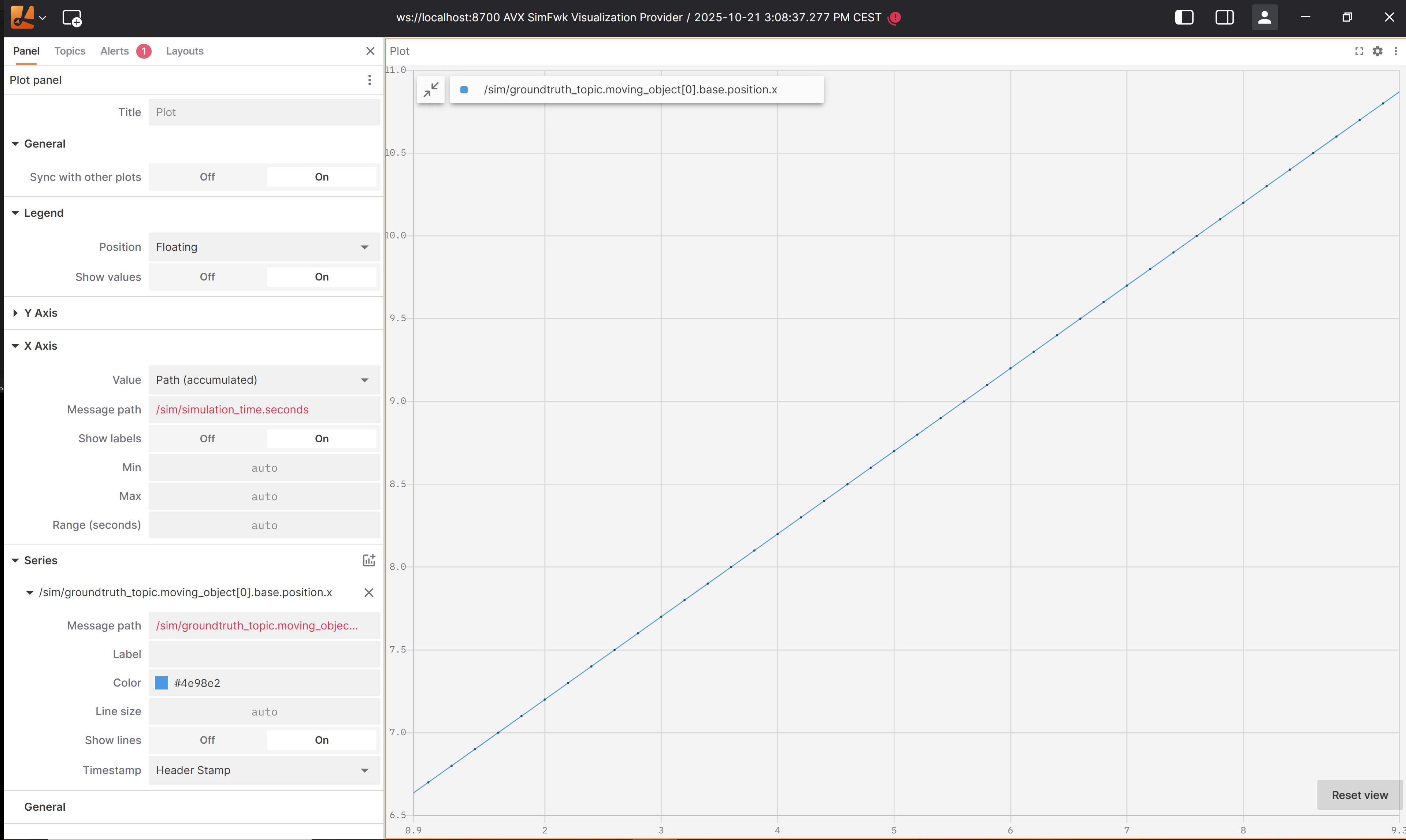
- The plot will be drawn if the simulation has not ended yet.
Using MCAP file:
- Run simulation using any scale factor with
save_mcapset totrueand topic_name set toSensorViewTopicinsolver_setting_configuration.jsonfile. - Select
Open a local filecreated in the previous step in Lichtblick. - Set any field to plot for y-axis from the /sim/groundtruth_topic
- Set seconds from /sim/simulation_time on the x-axis.
Refer settings at
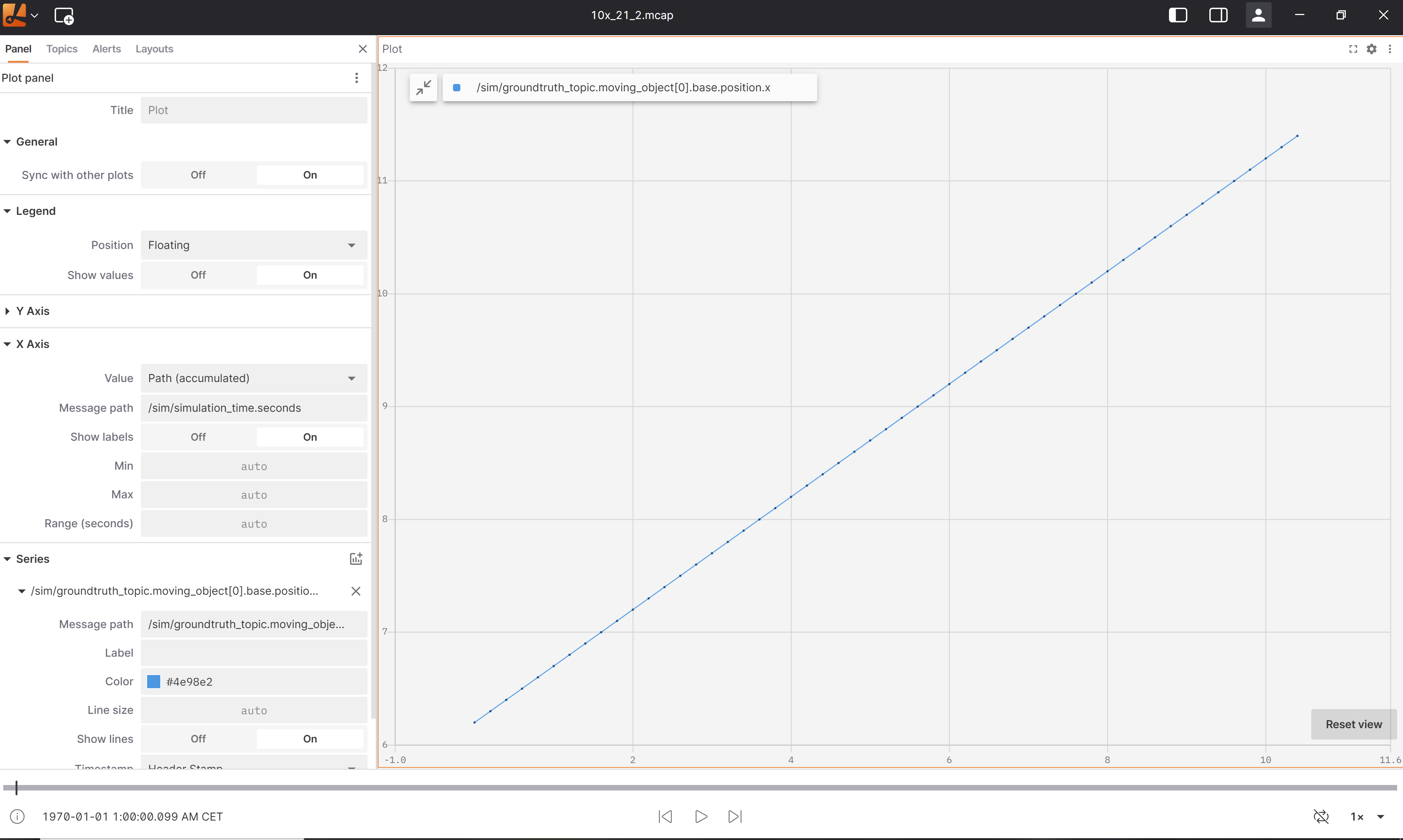
- The plot will be drawn for the mcap file selected.
GroundTruth Generator (GT Gen)
GT Gen serves as the default world simulator in Autonomy and provides ground truth information for the entire simulation based on input OpenScenario and OpenDRIVE files. Depending on the configuration, it can operate in two modes: ExternalMovement and InternalMovement.
- InternalMovement: This open-loop mode provides simulation ground truth based on a predefined trajectory in the open scenario and map.
- ExternalMovement (Closed-loop): This mode receives
TrafficUpdatefrom an external driver and follows its movement commands for closed-loop behavior.
Subscribing to OSC Variable References
GT Gen can optionally subscribe to ScenarioVariableTopic to receive dynamic variable updates during simulation. This feature enables runtime control of OpenScenario variable conditions (e.g., CarSpeedChangeCondition) from external activities. To enable this feature, add the enable_external_scenario_variables parameter to the groundtruth_generator_activity configuration:
{
    "activities": [
        {
            "name": "groundtruth_generator_activity",
            "is_primary_activity": true,
            "enable_external_scenario_variables": true,
            "type": "built-in"
        }
    ]
}
When enabled, GT Gen will subscribe to ScenarioVariableTopic and update simulation variables based on messages received from publishers. The default value is false if the parameter is not specified.
Mcap Trace Writer
This activity writes the GroundTruth (OSI) data into a trace file in MCAP format. After the simulation finishes successfully, the trace file simout_trace.mcap will be available in the specified output directory.
To enable creation of the trace file, user needs to add and enable the below field save_mcap as below in the config solver_setting_configuration.json.
{
    "sim_instance_name": "gt_gen_with_driver_and_kpi_logger",
    "foxglove":
    {
        "data_streaming": true,
        "host_name": "localhost",
        "port": 8700
    },
    "save_mcap": true,
    "activities": [
        {
            "name": "groundtruth_generator_activity",
            "is_primary_activity": true,
            "topics_cycling_info": [
                {
                    "topic_id": "__all__",
                    "topic_cycle_time_in_ms": 50
                }
            ],
            "type": "built-in"
        },
        {
            "name": "driver_model_activity",
            "depends_on": [
                "groundtruth_generator_activity"
            ],
            "type": "built-in"
        },
        {
            "name": "kpi_evaluator_activity",
            "depends_on": [
                "groundtruth_generator_activity"
            ],
            "type": "built-in"
        },
        {
            "name": "kpi_logger_activity",
            "depends_on": [
                "kpi_evaluator_activity"
            ],
            "type": "built-in"
        }
    ]
}
Dummy TPM Model
The Dummy Traffic Participant (TPM) model uses the ground truth information generated by GT Gen to control the host vehicle's movement. It relies on a simple mathematical model to publish TrafficUpdateTopic.
Dummy Driver Model
The Dummy Driver Model mimics driver behavior based on GroundTruth and publishes a driver input topic that contains log data (in KPI format) of the driver's behavior.
Standalone GroundTruth Generator
The Standalone GroundTruth Generator functions similarly to the built-in GroundTruth Generator. The difference is that it is a separate executable using the Simulation Framework standalone activity service.
Command-Line Options
The standalone GT Gen activity supports the following command-line options:
--subscribe-scenario-variable: Enable subscriber forScenarioVariableTopic. When this flag is set, the standalone activity will subscribe to variable reference messages and update simulation variables dynamically during runtime. This is useful for controlling OpenScenario variable conditions from external activities.
Example usage:
./standalone_gt_gen_activity --subscribe-scenario-variable
To view all available options:
./standalone_gt_gen_activity --help
Vehicle Model Activity
The single-track (also called bicycle) kinematic model is a low-order vehicle representation commonly used for path tracking and motion planning where lateral and yaw dynamics are dominant but high-frequency tire dynamics can be neglected. It is compact, computationally cheap, and suitable for control and simulation.
It is modelled as a builtin vehicle_activity within Simulation Framework.
This activity needs osi3::MotionRequest and osi3::SensorView messages and will output osi3::TrafficUpdate.
Files needed by this activity:
config_file— a vehicle configuration (controller gains, geometry and limits).
Example vehicle configuration
An example test vehicle configuration:
{
    "vehicle_name": "test_vehicle",
    "single_track": {
        "lf": 1.234,
        "lr": 1.234
    },
    "limits": {
        "max_acceleration": 2.3,
        "min_acceleration": -2.3,
        "max_steering_angle": 0.654,
        "min_steering_angle": -0.654
    },
    "controller_tuning": {
        "sensitivity": {
            "s_lon": 0.01,
            "s_lat": 0.01,
            "s_yaw": 0.01,
            "s_vel": 0.01,
            "s_jerk": 0.01,
            "s_steering": 0.01
        },
        "tracking": {
            "q_lon": 100.0,
            "q_lat": 80.0,
            "q_yaw": 2000.0,
            "q_vel": 2000.0,
            "q_steering": 2000.0
        },
        "restrictions": {
            "r_jerk": 0.1
        },
        "optimisation": {
            "prediction_horizon_steps": 2,
            "max_iterations": 50
        }
    }
}
States and Inputs
States (motion state):
- x, y — global position of the vehicle reference point (usually centre of gravity).
- psi — vehicle yaw (orientation).
- v — absolute longitudinal speed.
Inputs:
- a — longitudinal acceleration (control input).
- $\delta_f$ — steering angle at the front wheel (control input).
We define the input vector u = [a, $\delta_f$].
Model Equations
The continuous-time kinematic single-track model in activity is:
$$ \begin{aligned} \dot{x} &= v \cdot \cos(\psi + \beta_{CG})\\ \dot{y} &= v \cdot \sin(\psi + \beta_{CG})\\ \dot{\psi} &= \frac{v}{lr} \cdot \sin(\beta_{CG})\\ \dot{v} &= a\\ \end{aligned} $$
where the slip angle at the centre of gravity is defined as: $$\beta_{CG} = \arctan\left(\frac{lr}{lf+lr}\cdot \tan(\delta_f)\right)$$
Here $l_f$ and $l_r$ are the longitudinal distances from the centre of gravity to the front and rear axles respectively. The implementation in vehicle_activity uses these parameters from the vehicle configuration.
Controller: cost and tuning
The controller implemented with the single-track model that minimizes a weighted nonlinear least-squares cost:
$$ C(\boldsymbol{x}, \boldsymbol{u}) = \frac{1}{2} \sum_{i} W_i \left( y_i(\boldsymbol{x}, \boldsymbol{u}) - y_{i,\mathrm{ref}} \right)^2 $$
Here, $C(\boldsymbol{x}, \boldsymbol{u})$ represents the weighted mean square error between the predicted outputs $\boldsymbol{y}(\boldsymbol{x}, \boldsymbol{u})$ and the reference outputs $\boldsymbol{y_{\mathrm{ref}}}$. Each term in the summation is scaled by a weight $W_i$, which adjusts the importance of minimizing the error for the corresponding output component $y_i$.
$W_i = Q_i / (S_i * S_i)$
This cost drives the predicted outputs (typically motion states x, y, $\psi$, v) towards a reference trajectory provided by the motion planner.
Controller Gains to minimise cost function
- Tracking (
Q) : TheQgains adjust the controller's tracking accuracy for respective motion state properties (q_<property>). LargerQvalues result in higher accuracy and more aggressive minimization of tracking errors. - Sensitivity (
S) : TheSgains control the sensitivity of the controller to changes in respective motion state properties (s_<property>). SmallerSvalues make the controller more sensitive to incremental/decremental changes. - Restrictions (
R) : TheRgains limit the aggressiveness of the vehicle model inputs, such as the rate of change of acceleration. SmallerRvalues allow more aggressive behavior.
Optimization Parameters
The optimization parameters control the solver behavior. The controller predicts its next state by considering its current state and possible future states which is sent as a list of points via motion planner to controller.
prediction_horizon_steps: Determines how far into the future the controller considers when making decisions. Larger values result in more comprehensive predictions but may slow down the simulation. This value should always be greater than 1.
max_iterations: Specifies the maximum number of iterations the solver can perform. This parameter ensures the solver has enough time to find a solution in worst-case scenarios and is generally not expected to be modified.
"controller_tuning": {
    "sensitivity": {
        "s_lon": 0.01,
        "s_lat": 0.01,
        "s_yaw": 0.01,
        "s_vel": 0.01,
        "s_jerk": 0.01,
        "s_steering": 0.01
    },
    "tracking": {
        "q_lon": 100.0,
        "q_lat": 80.0,
        "q_yaw": 2000.0,
        "q_vel": 2000.0,
        "q_steering": 2000.0
    },
    "restrictions": {
        "r_jerk": 0.1
    },
    "optimisation": {
        "prediction_horizon_steps": 2,
        "max_iterations": 50
    }
}
Example of using vehicle_activity in simulation framework
An example simulation configuration to use the builtin vehicle_activity:
{
  "simulation_parameters": {
    "input_open_scenario": "<path to scenario>",
    "input_user_settings": "<path to user settings>",
    "output_directory": "sim_output",
    "job_id": "vehicle_activity_example"
  },
  "simulation_scheduling": {
    "sim_instance_name": "vehicle_activity_example",
    "activities": [
      {
        "name": "groundtruth_generator_activity",
        "is_primary_activity": true,
        "topics_cycling_info": [
          {
            "topic_id": "__all__",
            "topic_cycle_time_in_ms": 100
          }
        ],
        "type": "built-in"
      },
      {
        "name": "dummy_motion_planner",
        "depends_on": [
          "groundtruth_generator_activity"
        ],
        "type": "standalone"
      },
      {
        "name": "vehicle_activity",
        "depends_on": [
          "dummy_motion_planner"
        ],
        "type": "built-in",
        "vehicle_activity_settings": {
          "config_file": "path_to/test_vehicle.json"
        }
      }
    ]
  }
}
esmini — Environment Simulator Minimalistic
Overview
- esmini is a lightweight OpenSCENARIO runtime (OpenSCENARIO XML v1.0–v1.3, limited coverage) designed to simulate environment actors and scenarios.
- In this framework it is integrated as an built-in activity module and can be used as an alternative ground-truth generator to GT-Gen .
Quick highlights
- Supports OpenSCENARIO XML v1.0–v1.3 (feature coverage is partial and evolves), please refer here for coverage details.
How to configure esmini as an activity within Simulation Framework
{
  "simulation_parameters": {
    "input_open_scenario": "../path/to/scenario/simple_cut_in.xosc",
    "output_directory": "sim_output",
    "job_id": "esmini_example"
  },
  "simulation_scheduling": {
    "sim_instance_name": "esmini_instance",
    "activities": [
      {
        "name": "esmini_activity",
        "is_primary_activity": true,
        "topics_cycling_info": [
          {
            "topic_id": "__all__",
            "topic_cycle_time_in_ms": 100
          }
        ],
        "type": "built-in"
      },
      {
        "name": "dummy_tpm_activity",
        "depends_on": ["esmini_activity"],
        "type": "built-in"
      },
      {
        "name": "kpi_evaluator_activity",
        "depends_on": ["esmini_activity"],
        "type": "built-in"
      },
      {
        "name": "kpi_logger_activity",
        "depends_on": ["kpi_evaluator_activity"],
        "type": "built-in"
      }
    ]
  }
}
In this example esmini_activity is used as the main GroundTruth Data Generator which is producing osi::Sensorview, the host within simulation is controlled via dummy_tpm_activity. KPIs are evaluated and logged using kpi_evaluator_activity and kpi_logger_activity.
Important features supported by this activity
       {
                "name": "esmini_activity",
                "is_primary_activity": true,
                "topics_cycling_info": [
                    {
                        "topic_id": "__all__",
                        "topic_cycle_time_in_ms": 100
                    }
                ],
                "enable_external_scenario_variables": true,
                "disable_ctrls": true,
                "control_mode":"STANDARD",
                "max_longitudinal_distance" : 20.0,
                "max_lateral_deviation" : 0.05,
                "type": "built-in"
            },
-
disable_ctrlswhen true all external control is disabled to make esmini behave like gtgen when its control is with purely InternalController. If this is set to false (or in default case), esmini expects osi3::TrafficUpdate to control it -
control_modeconfigures how esmini accepts external control (only effective whendisable_ctrlsisfalse):-
STANDARDvalue enables control viaosi3::TrafficUpdatemessages (default). -
SIMPLE_VEHICLE_MODELenables control viaautonomy::communication::messages::VehicleControlInputmessages. Esmini listens forVehicleControlInputmessages published on theVehicleControlInputTopicand applies commands to a vehicle in the scenario. Three control modes are supported:ACC_N_STEER— provide acceleration (m/s^2) and steering angle (radians).ANALOG— provide continuous throttle and steering values. [-1.0,1.0].BINARY— provide discrete throttle/steering steps (-1, 0, 1).
The message used to control a vehicle is defined in
autonomy/communication/messages/vehicle_control_input_msg/vehicle_control_input_msg.h-
BINARY
control_mode = VehicleControlMode::BINARYthrottleandsteeringuse theintvariant. Values are limited to -1, 0, 1.
-
ANALOG
control_mode = VehicleControlMode::ANALOGthrottleandsteeringuse thedoublevariant.- Throttle is a continuous value between [-1, 1], -1 being full brake and 1 being full throttle, 0 being not applied. Steering is expected in the range [-1, 1] (normalized steering command) -1 is full left and 1 is full right.
-
ACC_N_STEER
control_mode = VehicleControlMode::ACC_N_STEERthrottleshould be adoublerepresenting desired acceleration in m/s^2.steeringshould be adoublerepresenting steering angle in radians.
Detailed usage of this mode is mentioned in example
examples/autonomy/external_vehicle_control
-
-
enable_external_scenario_variableswhen true , esmini will subscribe to ScenarioVariableTopic for scenario variable manipulation. -
max_longitudinal_distanceMaximum distance between OSI points in longitudinal direction default : 20.0 -
max_lateral_deviationMaximum distance between OSI points in lateral direction. It controls the resolution during curvature default : 0.05
References
- esmini User Guide: https://esmini.github.io
- esmini Inner Workings: https://github.com/esmini/esmini/blob/master/docs/InnerWorkings.md
- esmini repository: https://github.com/esmini/esmini
GroundTruth KPI Evaluator
The KPI Evaluator calculates four KPIs based on GroundTruth:
-
min_ttc: The minimum time to collision during the simulation. If the value is zero, it indicates a critical collision occurred during the simulation. -
predictive_min_ttc: The minimum time to collision during the simulation, considering the predictive movement of vehicles. If the value is zero, it indicates a critical collision occurred during the simulation. -
driven_dist: The total distance driven by the ego vehicle during the simulation. -
collision_detector: Records the first collision event(s) in the scenario. If no collision occurred, thevaluefield is{}. When present,valuecontains per-entity collision statistics. Typical fields and meanings:-
impact_location: NOT IMPLEMENTED - percentage overlap of collided entity with host width -
v_impact: host speed at time of collision (m/s). -
v_rel_impact: relative speed between host and the other object at impact (m/s). -
v_impact_reduction_stats: object with details about braking/impact mitigation:t1: time (seconds) when the host started actual deceleration;-1.0if deceleration never occurred.t2: time (seconds) when deceleration was insufficient to avoid the collision;-1.0if not applicable.total_v_impact_reduction: total speed reduction achieved before impact (m/s).
Note: The example in below section shows a case where the host collided with two objects simultaneously, and both collisions are recorded, one did reduce its speed other did not.
-
To add more KPIs to the simulation, please refer to the customized KPI chapter.
Default KPI logger
The KPI logger captures the evaluated KPI data in KpiLoggerTopic, sent from KPI Evaluator, and stores them in JSON output for analyzing your simulation later. If you use the default GroundTruth KPI Evaluator, the final KPI file kpi_results.json could consist of the following fields:
{
    "driven_dist": {
        "datatype": "double",
        "latest_timestamp_in_ms": 4000,
        "unit": "m",
        "value": 4.0
    },
    "min_ttc": {
        "datatype": "double",
        "latest_timestamp_in_ms": 4000,
        "unit": "ms",
        "value": 9.223372036854776e18
    },
    "predictive_min_ttc": {
        "datatype": "double",
        "latest_timestamp_in_ms": 4000,
        "unit": "ms",
        "value": 9.223372036854776e18
    },
    "collision_detector": {
        "datatype": "json",
        "latest_timestamp_in_ms": 41900,
        "unit": null,
        "value": {
            "1": {
                "self_collision_stats": [
                    {
                        "TrafficVehicle2": {
                            "impact_location": -1.0,
                            "v_impact": 11.0,
                            "v_impact_reduction_stats": {
                                "t1": 40.0,
                                "t2": 41.9,
                                "total_v_impact_reduction": 2.8888999999999996
                            },
                            "v_rel_impact": 11.0
                        }
                    },
                    {
                        "TrafficVehicle1": {
                            "impact_location": -1.0,
                            "v_impact": 13.8889,
                            "v_impact_reduction_stats": {
                                "t1": -1.0,
                                "t2": -1.0,
                                "total_v_impact_reduction": 0.0
                            },
                            "v_rel_impact": 13.8889
                        }
                    }
                ]
            }
        }
    }
}
How to safely utilize the KPI logger
As outlined above, the KPI logger subscribes to KPI messages and records them in a JSON file. To effectively use the KPI logger, follow these steps:
-
Set dependency on KPI evaluator In your simulation configuration, ensure that you set a dependency on the KPI evaluator. This KPI evaluator can be sourced from the reference simulation or a customized one. Once this dependency is established, the logger will capture all KPI messages.
-
Caution regarding dependency It is crucial to note that the KPI logger can operate independently, allowing you to run simulations without the KPI evaluator dependency. However, be mindful that doing so may result in incomplete logging. Running simulations using logger and evaluator in different frequencies may lead to the omission of certain KPI values. Exercise caution, as this could mean overlooking critical KPI information during the simulation.
-
Understanding potential hazards When running the simulation without the specified dependency, be aware that not all KPI values will be logged, if logger and evaluator run in different frequencies. Hence, some KPI samples might be neglected. This introduces the hazard of missing essential KPI data, requiring a thorough understanding of the circumstances and the potential impact on your evaluation.
By following these guidelines, you can ensure the safe and effective use of the KPI logger in your simulation. By verifying the field latest_timestamp_in_ms into your KPI analysis, you can enhance the reliability of your simulation results and foster a more robust safety protocol for your application.
Customization
The Simulation Framework Autonomy not only offers users the capability to extend or customize the default simulation setup but also empowers them to bring their own logic into specific activities and seamlessly communicate with other activities through the introduction of new topics. Additionally, users can incorporate new KPIs, which will be automatically logged by the Simulation Framework.
For detailed instructions on implementing and using customized activities, refer to how to implement and use customized Activity. Furthermore, guidance on adding and utilizing customized KPIs can be found in how to add and use customized KPIs.
Simulation domain ID
The connection between standalone activities, built-in activities and simfwk core is achieved through RTIDDS communication using the domain ID (in type of uint16). By default, the binaries in the deployment package use the same domain 147 as default and can communicate with each other.
For the use case where you want to customized the domain ID, i.e. to isolate one standalone activity from simfwk_cli or want to run two simfwk_cli executables in the same machine. for instance, you can adapt the simfwk_cli domain ID through environment variable:
# open new terminal and adapt the Domian ID in this console
export SIMFWK_DDS_DOMAIN_ID=<other_uint16_number>
# then execute simfwk_cli, it will runs in different domain
./simfwk_cli -s <your_solver_setting_config.json>
or run one customized activity in different domain rather than default 147
# open new terminal and adapt the Domian ID in this console
export SIMFWK_DDS_DOMAIN_ID=407
# then execute simfwk_cli, it will runs in domain 407
./your_customized_activity_executable
Note that please be careful to use this feature because two same processes in the same domain might interfere with each other and results in unexpected behavior, e.g. two simfwk_cli run in same domain will received events from other and simulation ends up with wrong scheduling or abortion. Please make sure the processes are isolated correctly if you use this feature and no unexpected hidden process running in background within the same domain, while testing your customized activity.
Troubleshooting
If simulation or setup faced critical error and can not proceed, Simulation Framework will terminate the simulation or throw exceptions with proper messages to indicate a solution or root causes.
Licensing error
Unset of ANSYSLMD_LICENSE_FILE
[Licensing] Trying to connect with Ansys License Manager...
[Licensing] environment variable ANSYSLMD_LICENSE_FILE for connection with ALM is not set!
Connection with license server failed
[Licensing] Trying to connect with Ansys License Manager...
[Licensing] License check with Ansys License Manager at <your-ansys-license-domain> failed! Please verify address or contact customer support!
Path error
Can not access simulation config
If one non-existing path to the scheduling config is given or you do not have read permission to this file, simulation cannot be started and raises following error:
[ERROR][Scheduling] ConfigParser: Scheduling config json file does not exist or failed to load: non-existing.json.
terminate called after throwing an instance of 'std::runtime_error'
  what():  [Scheduling] Error in scheduling configuration!
Scheduling error
Wrong definition in config
Any wrong definitions, e.g. missing mandatory field or wrongly defined parameter, name or dependency, exception will be thrown immediately.
E.g. If no activity is assigned as is_primary_activity in scheduling config, simulation cannot be started and raises following error:
[ERROR][Scheduling] ConfigParser: No Activity is assigned as 'is_primary_activity: true'. One Activity must be assigned as primary activity for simulation.
terminate called after throwing an instance of 'std::runtime_error'
  what():  [Scheduling] Error in scheduling configuration!
Failed connection to activity
In case one scheduling event was sent from scheduler server of Simulation Framework but an expected feedback is missing, simulation aborts immediately to ensure the deterministic behavior.
This happens usually when running your application with standalone activity, where it loses the connection with main process or dead. In that case, you will see this kind of error like following:
[ERROR][Scheduling] Timed out on receiving feedback for Events:
SchedulingEvent with ID 12 at Simulation timestamp: 0 second and 0 nanos
 was sent to my_standalone_activity_simfwk_standalone_activity_service with standalone activity action StandaloneActivityAction::kInit
Please check your network setup towards the standalone activities
Terminating due to an unhandled exception:
    std::runtime_error
    what(): [Scheduling] Timed out on receiving feedback for Events:
Receiving scheduling event from unexpected source
In case one unexpected event was received by scheduler server, simulation aborts immediately by raising following error:
[ERROR][Communication] Error _Map_base::at was caught or received following feedback for a non-existing event. Probably it already timed-out:
SchedulingFeedback for the Event with ID 11 received and its action result is ActionResult::kSuccess
Executing original terminate handler...terminate called after throwing an instance of 'std::runtime_error'
The root cause of this issue could be that the environment where your simulation applicaiont runs does not have enough resouces, e.g. the CPU was stressed or memory is not enough. Other possible reason is that you have another application process built with Simulation Framework running in the same simulation domain. Please refer to the documentation of Simulation domain ID section in lifecycle
Communication error
Multiple publisher for same Topic
In Simulation Framework, it is not allowed to have more than one publisher on one Topic. The identifier is the unique TopicId in type string.
If you try to create publishers on same Topic, e.g. on "YourTopic", following error will be raised:
Terminating due to an unhandled exception:
    std::runtime_error
    what(): [Communication] Found one already created Publisher for the Topic <NameOfDuplicatedTopic>. Multiple publishers for same Topic are not allowed!
Used undefined topic
If you try to use undefined Topic, e.g. "UndefinedTopic", from topic registry (core/communication/topic_registry.h) or use one Topic in Activity without registering it in constructor, following error will be raised:
[ERROR][Communication] Topic <UndefinedTopic> is not found in the registry for Activity <ActivityName>
[ERROR][Communication] Concrete Topic instance is required by constructor of Activity or corresponding CommunicationManager.
Terminating due to an unhandled exception:
    std::runtime_error
    what(): [Communication] Undefined Topic.
Missing Publisher/Subscriber for one Topic
To optimize simulation load, the system does not permit starting a simulation if an activity publishes a topic that lacks a subscriber. Before the simulation begins, the system checks for matching publishers and subscribers. A default timeout of 10 seconds is applied during this check. If no subscriber is found within this period, the system will throw an exception to indicate the failure.
...
[DEBUG][Communication] Awaiting subscriber match for topic 'NoSubscriberTopic' (timeout: 10000 ms)
[DEBUG][Communication] Awaiting subscriber match for topic 'NoSubscriberTopic' (timeout: 10000 ms)
[ERROR][Communication] Failed on waiting for Subscriber to the Topic NoSubscriberTopic. Please check your simulation settings if Subscriber for this Topic is missing.
Terminating due to an unhandled exception:
    std::runtime_error
    what(): [Communication] Awaiting publisher/subscriber failed.
and vice versa, if you missing publisher for one Topic:
[DEBUG][Communication] Awaiting publisher match for topic 'NoPublisherTopic' (timeout: 10000 ms)
[DEBUG][Communication] Awaiting publisher match for topic 'NoPublisherTopic' (timeout: 10000 ms)
[ERROR][Communication] Failed on waiting for Publisher on the Topic NoPublisherTopic. Please check your simulation settings if Publisher for this Topic is missing.
Terminating due to an unhandled exception:
    std::runtime_error
    what(): [Communication] Awaiting publisher/subscriber failed.
Security consideration
By prioritizing these security measures, Simulation Framework aims to provide a secure environment for the user to RTI DDS communication as middleware and mitigate risks associated with third-party integrations.
Third-party integration security
- Conduct thorough security assessments of third-party components.
- Regularly review and update dependencies to mitigate vulnerabilities.
- Promptly address vulnerabilities in third-party dependencies.
RTI DDS as communication
- Access Control: Enforce access control policies to restrict which entities can publish or subscribe to specific topics within the specified DDS domain.
- Data Encryption: Implement robust encryption mechanisms to ensure the confidentiality of data transmitted over RTI DDS. Configure encryption settings to adhere to industry best practices and regulatory requirements.
- Authentication: Enforce strong authentication mechanisms to verify the identities of participants within the DDS network. Utilize authentication protocols supported by RTI DDS to prevent unauthorized access and ensure the integrity of the communication.
Additional documentation and user forums can be found on rti community.