## On this page
# EnSight Command and Control API
Last update: 16.07.2025
The EnSight client itself serves as a gRPC server. One can enable the interface using the command line option `-grpc_server port`. EnSight supports the gRPC server interface in both batch and full UI modes and if no port is specified, the default port is: 18243. For example, EnSight can be launched in batch with the gRPC server interface enabled with the command:
shell
ensight252 -batch -grpc_server 15000
This will start EnSight in batch, listening for gRPC connections on port 15000. The EnSight gRPC server will continue to run and accept new connections until the EnSight executable is stopped, usually via the gRPC "Exit" call.
# Security Token
The gRPC interface supports the EnSight shared secret security token as well. If EnSight has been launched with a security token enabled, the token must be passed in the metadata with every gRPC method invocation. EnSight can be launched with `-security {number}` on the command line or one can set the environmental variable: `ENSIGHT_SECURITY_TOKEN` to the token string. The example illustrates how the token is added to the metadata. Note, the environmental variable is a more secure approach than the command line option.
# Built-in Example
All the necessary Python grpc modules are included in the EnSight `cpython` distribution. To run the example program, one can use the following commands:
shell
cd v252\CEI\ensight252\site_preferences\extensions\grpc
..\..\..\..\bin\cpython252 qt_gui.py
Directly, without running pip or protoc, as the ensight\_pb2 and ensight\_pb2\_grpc modules are built into the EnSight cpython.
The demo will launch EnSight in batch mode with the gRPC interface active, connect to it and allow simple brokered interactions (the File->Open menu will allow CFX .res data and EnSight .case files to be loaded in the session).
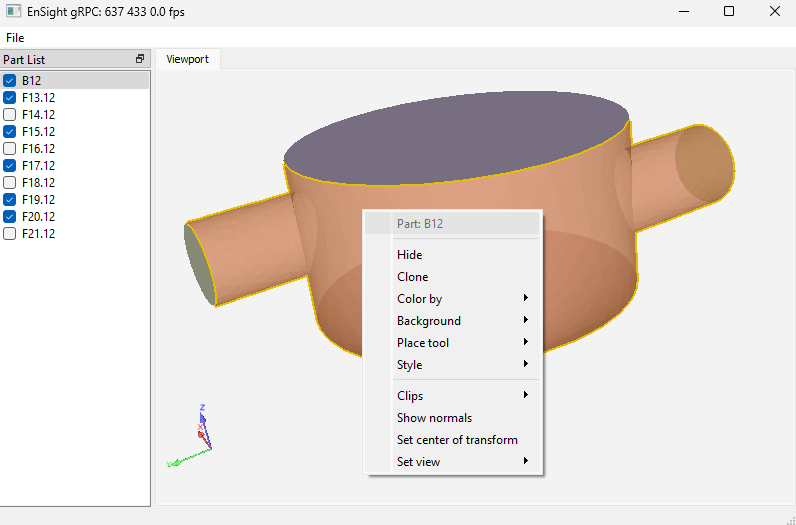
The source code to the built in example above is included in the distribution in: `v252\CEI\ensight252\site_preferences\extensions\grpc`. Files include:
- `build.sh` - a script file that compiles the .proto file into Python modules
- `ensight.proto` - the gRPC protocol specification
- `ensight_grpc.py` - a module that wraps the gRPC protocol with a simplified interface (see below)
- `qt_gui.py` - a Python PyQt GUI application that launches EnSight and talks to it via gRPC
# Simple Python Example (for a non-Ansys Python distribution)
In this example, we will configure a Python instance to connect to EnSight and enable it to make gRPC calls.
The first step is to get a Python interpreter instance up and running with the necessary gRPC modules installed. The example code here assumes the command 'python' will launch a platform native Python 3.x interpreter.
.bash
python -m pip install grpcio
python -m pip install grpcio-tools googleapis-common-protos
Make a copy of the [ensight.proto](ensight_8proto_source.html) file and compile the gRPC wrappers for it. In distributions, the .proto file is included in: `v252/CEI/ensight252/site_preferences/extensions/grpc`.
shell
cp v252/CEI/ensight252/site_preferences/extensions/grpc/ensight.proto .
python -m grpc_tools.protoc --python_out=. --grpc_python_out=. -I. ensight.proto
To use the interface, one needs a bit of gRPC glue code to run in the Python client. A simple example of a class implementing the basic functionality would be ([ensight\_grpc.py](ensight__grpc_8py_source.html) in the same directory as the [ensight.proto](ensight_8proto_source.html) file noted above in any EnSight distribution).
Methods are provided to render an image, return a glTF representation of the current scene geometry and to be able to execute Python code in the EnSight embedded interpreter. An example of using the interface to compute some variables in EnSight and export image/gltf data representations is illustrated here:
shell
% python
Python 3.4.4 |Anaconda 4.0.0 (64-bit)| (default, Feb 16 2016, 09:54:04) [MSC v.1600 64 bit (AMD64)] on win32
Type "help", "copyright", "credits" or "license" for more information.
>>> import ensight_grpc
>>> s = ensight_grpc.EnSightGRPC()
>>> pid = s.start_server()
>>> s.connect()
>>> s.command("grpc_test=10.0", do_eval=False)
>>> s.command("grpc_test*22.0")
220.0
>>> png = s.render()
>>> with open("test.png","wb") as f:
... _ =f.write(png)
>>> gltf = s.geometry()
>>> with open("test.glb", "wb") as f:
... _ = f.write(gltf)
>>> s.stop_server()
# Streaming APIs
The streaming interfaces are largely wrapped in the example above. The client application starts the streams by making the gRPC GetEventStream or GetImageStream calls. These return streams of EventReply and ImageReply protobuf objects respectively. These will continue to send values until the starting methods are ended (effectively, these are serviced by asynchronous threads running in the EnSight client application). The wrapper above creates Python threads to read protocol buffers and place them into the interface object (EnSightGRPC) for later access by the calling application. The complex example (qt\_gui.py) contains one example of how these might be interfaced into your client application.
## Event Streaming API
The event stream is tied into the EnSight Python attribute callback API (see these docs). When Python code running in EnSight calls:
python
ensight.objs.addcallback( targetobject, None, tag, attrs=[attr1, attr2])
it sets up a callback. The callback will return the 'tag' whenever one of the attributes listed in 'attrs' on the target object changes. For example:
python
ensight.objs.addcallback( ensight.objs.core.PARTS[0], None, "grpc://MYTAG/VISIBLE", attrs=["VISIBLE"])
will cause an EventReply protobuf to be returned with the tag: `grpc://MYTAG/VISIBLE?enum=VISIBLE&uuid=233` when the visibility of the first part (note that `ensight.objs.core.PARTS[0].__objid__ == 223` in the example) changes. See the qt\_gui.py and [ensight\_grpc.py](ensight__grpc_8py_source.html) for more examples. Note: there is nothing special about the `grpc://MYTAG/VISIBLE` name, it could be any string. It is handy to allow the URI parser to handle parsing as the core will append the 'enum' and 'uuid' query stanzas to the tag automatically.
# Image Streaming API
This API is very simple. Once enabled, image protobuffers will be sent whenever EnSight re-renders the 3D scene. The contents of the protobuf will be a raw, byte-level representation of the image along with the size of the image. The image data itself is 3 bytes/pixel in the order RRGGBB with no extra padding at the end of a scanline. The starting call allows for vertical flipping of the image before it is transmitted. At the moment, no compression schemes have been defined.