

ZOS-API interface 2025 R1

ZOSAPI.Editors.LDE.ILDERow Interface Reference

Last update: 17.07.2025

All data for a Lens Data Editor surface. This interface can be accessed via the ILensDataEditor interface. More...
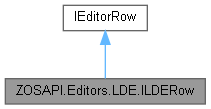
Inheritance diagram for ZOSAPI.Editors.LDE.ILDERow:

Public Member Functions

IEditorCell GetSurfaceCell (SurfaceColumn Col)
 Gets the specified surface cell data.
 
SurfaceType[] AvailableSurfaceTypes ()
 Gets an array of all available surface types.
 
ISurfaceTypeSettings GetSurfaceTypeSettings (SurfaceType type)
 Create the settings for the specified type. Use this method to specify any extra data required to change to the appropriate surface type (i.e. external files).
 
bool ChangeType (ISurfaceTypeSettings settings)
 Changes the current surface to the specified type. Use GetSurfaceTypeSettings to get the relevant settings.
 
IMetadata GetMetadata ()
 
ICoatingPerformanceData GetCoatingPerformanceData ()
 
- Public Member Functions inherited from ZOSAPI.Editors.IEditorRow
IEditorCell GetCellAt (int pos)
 Gets the cell at the specified index (IEditor.MinColumn to IEditor.MaxColumn).
 

Properties

bool IsActive [get]
 Gets a value indicating whether this instance is active (i.e. refers to a valid surface in the system).
 
int SurfaceNumber [get]
 Gets the surface number for this row.
 
string TypeName [get]
 Gets the full name of the current Type
 
SurfaceType Type [get]
 Gets the current surface type.
 
ISurfaceTypeSettings CurrentTypeSettings [get]
 Gets settings for the current type (i.e. external files). Note that the current type can only be changed via the ChangeType method.
 
bool IsObject [get]
 Gets a value indicating whether this instance is the object surface.
 
bool IsImage [get]
 Gets a value indicating whether this instance is the image surface.
 
bool IsStop [get, set]
 Gets or sets a value indicating whether this instance is the stop surface.
 
ISurface SurfaceData [get]
 
ILDETypeData TypeData [get]
 Gets the Surface Type data.
 
ILDEDrawData DrawData [get]
 Gets the surface Aperture data.
 
ILDEApertureData ApertureData [get]
 Gets the surface Aperture data.
 
ILDEScatteringData ScatteringData [get]
 Gets the surface Scattering data.
 
ILDETiltDecenterData TiltDecenterData [get]
 Gets the surface Tile/Decenter data.
 
ILDEPhysicalOpticsData PhysicalOpticsData [get]
 Gets the surface Physical Optics data.
 
ILDECoatingData CoatingData [get]
 Gets the surface Coating data.
 
ILDEImportData ImportData [get]
 Gets the surface Import data.
 
ILDECompositeData CompositeData [get]
 Gets the surface Composite data.
 
string Comment [get, set]
 
IEditorCell CommentCell [get]
 
double Radius [get, set]
 
IEditorCell RadiusCell [get]
 
double Thickness [get, set]
 Gets or sets the surface thickness.
 
IEditorCell ThicknessCell [get]
 
string Material [get, set]
 
IEditorCell MaterialCell [get]
 
string Coating [get, set]
 
IEditorCell CoatingCell [get]
 
double SemiDiameter [get, set]
 
IEditorCell SemiDiameterCell [get]
 
double ChipZone [get, set]
 
IEditorCell ChipZoneCell [get]
 
double MechanicalSemiDiameter [get, set]
 
IEditorCell MechanicalSemiDiameterCell [get]
 
double Conic [get, set]
 
IEditorCell ConicCell [get]
 
double TCE [get, set]
 
IEditorCell TCECell [get]
 
long SurfaceId [get]
 
ISTAR_Data STARData [get]
 
string MaterialCatalog [get]
 
- Properties inherited from ZOSAPI.Editors.IEditorRow
IEditor Editor [get]
 Gets the editor this row was retrieved from.
 
bool IsValidRow [get]
 Gets a value indicating whether this instance is currently valid. Note that the RowIndex for this object is fixed, so removing one or more rows from the editor may cause it to be invalid.
 
int RowIndex [get]
 Gets the index of this row in the editor.
 
string RowTypeName [get]
 Gets the type of this row; this can be a surface for the LDE, object for the NCE, etc.
 
string Bookmark [get, set]
 

Detailed Description

Member Function Documentation

◆ AvailableSurfaceTypes()

SurfaceType[] ZOSAPI.Editors.LDE.ILDERow.AvailableSurfaceTypes ( )

Gets an array of all available surface types.

Returns

◆ ChangeType()

bool ZOSAPI.Editors.LDE.ILDERow.ChangeType ( ISurfaceTypeSettings  settings)

Changes the current surface to the specified type. Use GetSurfaceTypeSettings to get the relevant settings.

Usage (see Example 19 for a full sample)

C#

// To change surface type, we need to first get an ISurfaceTypesettings and then assign it.
ISurfaceTypeSettings SurfaceType_CB = TheLDE.GetSurfaceAt(4).GetSurfaceTypeSettings(SurfaceType.CoordinateBreak);
TheLDE.GetSurfaceAt(4).ChangeType(SurfaceType_CB);
This interface is used for selecting any files required by a surface, and for changing surface types....
Definition: InterfacesLDE.cs:746
SurfaceType
All available surface types.
Definition: InterfacesLDE.cs:27

C++

// To change surface type, we need to first get an ISurfaceTypesettings and then assign it.
ISurfaceTypeSettingsPtr SurfaceType_CB = TheLDE->GetSurfaceAt(4)->GetSurfaceTypeSettings(SurfaceType_CoordinateBreak);
TheLDE->GetSurfaceAt(4)->ChangeType(SurfaceType_CB);

Matlab

% To change surface type, we need to first get an ISurfaceTypesettings and then assign it.
SurfaceType_CB = TheLDE.GetSurfaceAt(4).GetSurfaceTypeSettings(ZOSAPI.Editors.LDE.SurfaceType.CoordinateBreak);
TheLDE.GetSurfaceAt(4).ChangeType(SurfaceType_CB);
Definition: InterfacesLDE.cs:8
Definition: InterfacesEditors.cs:12
The ZOSAPI namespace contains classes for initially connecting to zemax. See also ZOSAPI_Connection,...
Definition: IAS_FieldCurvatureAndDistortion.cs:5

Python

# To change surface type, we need to first get an ISurfaceTypesettings and then assign it.
SurfaceType_CB = TheLDE.GetSurfaceAt(4).GetSurfaceTypeSettings(ZOSAPI.Editors.LDE.SurfaceType.CoordinateBreak)
TheLDE.GetSurfaceAt(4).ChangeType(SurfaceType_CB)
Parameters
settingsThe settings.
Returns
true if the change was successful.
Examples
CSharpStandalone_07_TiltDecenterAndMFOperand.cs, CSharpStandalone_12_Seq_SystemExplorer.cs, and CSharpStandalone_19_Surface_Properties.cs.

◆ GetCoatingPerformanceData()

ICoatingPerformanceData ZOSAPI.Editors.LDE.ILDERow.GetCoatingPerformanceData ( )

◆ GetMetadata()

IMetadata ZOSAPI.Editors.LDE.ILDERow.GetMetadata ( )

◆ GetSurfaceCell()

IEditorCell ZOSAPI.Editors.LDE.ILDERow.GetSurfaceCell ( SurfaceColumn  Col)

Gets the specified surface cell data.

Parameters
ColThe column.
Returns
Examples
CSharpStandalone_19_Surface_Properties.cs.

◆ GetSurfaceTypeSettings()

ISurfaceTypeSettings ZOSAPI.Editors.LDE.ILDERow.GetSurfaceTypeSettings ( SurfaceType  type)

Create the settings for the specified type. Use this method to specify any extra data required to change to the appropriate surface type (i.e. external files).

Usage (see Example 19 for a full sample)

C#

// To change surface type, we need to first get an ISurfaceTypesettings and then assign it.
ISurfaceTypeSettings SurfaceType_CB = TheLDE.GetSurfaceAt(4).GetSurfaceTypeSettings(SurfaceType.CoordinateBreak);
TheLDE.GetSurfaceAt(4).ChangeType(SurfaceType_CB);

C++

// To change surface type, we need to first get an ISurfaceTypesettings and then assign it.
ISurfaceTypeSettingsPtr SurfaceType_CB = TheLDE->GetSurfaceAt(4)->GetSurfaceTypeSettings(SurfaceType_CoordinateBreak);
TheLDE->GetSurfaceAt(4)->ChangeType(SurfaceType_CB);

Matlab

% To change surface type, we need to first get an ISurfaceTypesettings and then assign it.
SurfaceType_CB = TheLDE.GetSurfaceAt(4).GetSurfaceTypeSettings(ZOSAPI.Editors.LDE.SurfaceType.CoordinateBreak);
TheLDE.GetSurfaceAt(4).ChangeType(SurfaceType_CB);

Python

# To change surface type, we need to first get an ISurfaceTypesettings and then assign it.
SurfaceType_CB = TheLDE.GetSurfaceAt(4).GetSurfaceTypeSettings(ZOSAPI.Editors.LDE.SurfaceType.CoordinateBreak)
TheLDE.GetSurfaceAt(4).ChangeType(SurfaceType_CB)
Parameters
typeThe desired type.
Returns
Examples
CSharpStandalone_07_TiltDecenterAndMFOperand.cs, CSharpStandalone_12_Seq_SystemExplorer.cs, and CSharpStandalone_19_Surface_Properties.cs.

Property Documentation

◆ ApertureData

ILDEApertureData ZOSAPI.Editors.LDE.ILDERow.ApertureData
get

Gets the surface Aperture data.

The Type data interface.

Examples
CSharpStandalone_11_Basic_Seq.cs, and CSharpStandalone_19_Surface_Properties.cs.

◆ ChipZone

double ZOSAPI.Editors.LDE.ILDERow.ChipZone
getset

◆ ChipZoneCell

IEditorCell ZOSAPI.Editors.LDE.ILDERow.ChipZoneCell
get

◆ Coating

string ZOSAPI.Editors.LDE.ILDERow.Coating
getset

◆ CoatingCell

IEditorCell ZOSAPI.Editors.LDE.ILDERow.CoatingCell
get

◆ CoatingData

ILDECoatingData ZOSAPI.Editors.LDE.ILDERow.CoatingData
get

Gets the surface Coating data.

The Coating data interface.

◆ Comment

string ZOSAPI.Editors.LDE.ILDERow.Comment
getset

Usage (see Example 01 for a full sample)

C#

// Changes surface cells in LDE
Surface_1.Thickness = 50.0;
Surface_1.Comment = "Stop is free to move";
Surface_2.Radius = 100.0;
Surface_2.Thickness = 10.0;
Surface_2.Comment = "front of lens";
Surface_2.Material = "N-BK7";
Surface_3.Comment = "rear of lens";

C++

// Changes surface cells in LDE
Surface_1->Thickness = 50.0;
Surface_1->Comment = "Stop is free to move";
Surface_2->Radius = 100.0;
Surface_2->Thickness = 10.0;
Surface_2->Comment = "front of lens";
Surface_2->Material = "N-BK7";
Surface_3->Comment = "rear of lens";

Matlab

% Changes surface cells in LDE
Surface_1.Thickness = 50.0;
Surface_1.Comment = 'Stop is free to move';
Surface_2.Radius = 100.0;
Surface_2.Thickness = 10.0;
Surface_2.Comment = 'front of lens';
Surface_2.Material = 'N-BK7';
Surface_3.Comment = 'rear of lens';
@ LDE
Lens Data Editor.

Python

# Fields
Field_1 = TheSystemData.Fields.GetField(1)
NewField_2 = TheSystemData.Fields.AddField(0, 5.0, 1.0)

◆ CommentCell

IEditorCell ZOSAPI.Editors.LDE.ILDERow.CommentCell
get

◆ CompositeData

ILDECompositeData ZOSAPI.Editors.LDE.ILDERow.CompositeData
get

Gets the surface Composite data.

The Composite data interface.

◆ Conic

double ZOSAPI.Editors.LDE.ILDERow.Conic
getset

◆ ConicCell

IEditorCell ZOSAPI.Editors.LDE.ILDERow.ConicCell
get

◆ CurrentTypeSettings

ISurfaceTypeSettings ZOSAPI.Editors.LDE.ILDERow.CurrentTypeSettings
get

Gets settings for the current type (i.e. external files). Note that the current type can only be changed via the ChangeType method.

The current type settings.

◆ DrawData

ILDEDrawData ZOSAPI.Editors.LDE.ILDERow.DrawData
get

Gets the surface Aperture data.

The Draw data interface.

◆ ImportData

ILDEImportData ZOSAPI.Editors.LDE.ILDERow.ImportData
get

Gets the surface Import data.

The Import data interface.

◆ IsActive

bool ZOSAPI.Editors.LDE.ILDERow.IsActive
get

Gets a value indicating whether this instance is active (i.e. refers to a valid surface in the system).

true if this instance is active; otherwise, false.

◆ IsImage

bool ZOSAPI.Editors.LDE.ILDERow.IsImage
get

Gets a value indicating whether this instance is the image surface.

◆ IsObject

bool ZOSAPI.Editors.LDE.ILDERow.IsObject
get

Gets a value indicating whether this instance is the object surface.

◆ IsStop

bool ZOSAPI.Editors.LDE.ILDERow.IsStop
getset

Gets or sets a value indicating whether this instance is the stop surface.

◆ Material

string ZOSAPI.Editors.LDE.ILDERow.Material
getset

Usage (see Example 19 for a full sample)

C#

// Get interface of Lens Data Editor and add 3 surfaces.
ILensDataEditor TheLDE = TheSystem.LDE;
TheLDE.InsertNewSurfaceAt(2);
// Set thickness and material for each surface.
TheLDE.GetSurfaceAt(1).Thickness = 30;
TheLDE.GetSurfaceAt(2).Thickness = 20;
TheLDE.GetSurfaceAt(4).Thickness = 30;
TheLDE.GetSurfaceAt(2).Material = "N-BK7";
double Thickness
Gets or sets the surface thickness.
Definition: InterfacesLDE.cs:1009
string Material
Definition: InterfacesLDE.cs:1023
This interface defines all properties and methods needed to interact with the Lens Data Editor....
Definition: InterfacesLDE.cs:265
ILDERow GetSurfaceAt(int SurfaceNumber)
Gets the data for the specified surface.
ILDERow InsertNewSurfaceAt(int SurfaceNumber)
Inserts a new surface at the specified position.

C++

// Get interface of Lens Data Editor and add 3 surfaces.
ILensDataEditorPtr TheLDE = TheSystem->LDE;
TheLDE->InsertNewSurfaceAt(2);
// Set thickness and material for each surface.
TheLDE->GetSurfaceAt(1)->Thickness = 30;
TheLDE->GetSurfaceAt(2)->Thickness = 20;
TheLDE->GetSurfaceAt(4)->Thickness = 30;
TheLDE->GetSurfaceAt(2)->Material = "N-BK7";

Matlab

% Get interface of Lens Data Editor and add 3 surfaces.
TheLDE = TheSystem.LDE;
TheLDE.InsertNewSurfaceAt(2);
% Set thickness and material for each surface.
TheLDE.GetSurfaceAt(1).Thickness = 30;
TheLDE.GetSurfaceAt(2).Thickness = 20;
TheLDE.GetSurfaceAt(4).Thickness = 30;
TheLDE.GetSurfaceAt(2).Material = 'N-BK7';

Python

# Get interface of Lens Data Editor and add 3 surfaces.
TheLDE = TheSystem.LDE
TheLDE.InsertNewSurfaceAt(2)
# Set thickness and material for each surface.
TheLDE.GetSurfaceAt(1).Thickness = 30
TheLDE.GetSurfaceAt(2).Thickness = 20
TheLDE.GetSurfaceAt(4).Thickness = 30
TheLDE.GetSurfaceAt(2).Material = 'N-BK7'
Examples
CSharpStandalone_19_Surface_Properties.cs.

◆ MaterialCatalog

string ZOSAPI.Editors.LDE.ILDERow.MaterialCatalog
get

◆ MaterialCell

IEditorCell ZOSAPI.Editors.LDE.ILDERow.MaterialCell
get

◆ MechanicalSemiDiameter

double ZOSAPI.Editors.LDE.ILDERow.MechanicalSemiDiameter
getset

◆ MechanicalSemiDiameterCell

IEditorCell ZOSAPI.Editors.LDE.ILDERow.MechanicalSemiDiameterCell
get

◆ PhysicalOpticsData

ILDEPhysicalOpticsData ZOSAPI.Editors.LDE.ILDERow.PhysicalOpticsData
get

Gets the surface Physical Optics data.

The Physical Optics data interface.

◆ Radius

double ZOSAPI.Editors.LDE.ILDERow.Radius
getset

Usage (see Example 01 for a full sample)

C#

// Changes surface cells in LDE
Surface_1.Thickness = 50.0;
Surface_1.Comment = "Stop is free to move";
Surface_2.Radius = 100.0;
Surface_2.Thickness = 10.0;
Surface_2.Comment = "front of lens";
Surface_2.Material = "N-BK7";
Surface_3.Comment = "rear of lens";

C++

// Changes surface cells in LDE
Surface_1->Thickness = 50.0;
Surface_1->Comment = "Stop is free to move";
Surface_2->Radius = 100.0;
Surface_2->Thickness = 10.0;
Surface_2->Comment = "front of lens";
Surface_2->Material = "N-BK7";
Surface_3->Comment = "rear of lens";

Matlab

% Changes surface cells in LDE
Surface_1.Thickness = 50.0;
Surface_1.Comment = 'Stop is free to move';
Surface_2.Radius = 100.0;
Surface_2.Thickness = 10.0;
Surface_2.Comment = 'front of lens';
Surface_2.Material = 'N-BK7';
Surface_3.Comment = 'rear of lens';

Python

# Changes surface cells in LDE
Surface_1.Thickness = 50.0
Surface_1.Comment = 'Stop is free to move'
Surface_2.Radius = 100.0
Surface_2.Thickness = 10.0
Surface_2.Comment = 'front of lens'
Surface_2.Material = 'N-BK7'
Surface_3.Comment = 'rear of lens'

◆ RadiusCell

◆ ScatteringData

ILDEScatteringData ZOSAPI.Editors.LDE.ILDERow.ScatteringData
get

Gets the surface Scattering data.

The Scattering data interface.

◆ SemiDiameter

double ZOSAPI.Editors.LDE.ILDERow.SemiDiameter
getset

◆ SemiDiameterCell

IEditorCell ZOSAPI.Editors.LDE.ILDERow.SemiDiameterCell
get

◆ STARData

ISTAR_Data ZOSAPI.Editors.LDE.ILDERow.STARData
get

◆ SurfaceData

ISurface ZOSAPI.Editors.LDE.ILDERow.SurfaceData
get

◆ SurfaceId

long ZOSAPI.Editors.LDE.ILDERow.SurfaceId
get

◆ SurfaceNumber

int ZOSAPI.Editors.LDE.ILDERow.SurfaceNumber
get

Gets the surface number for this row.

The surface number.

◆ TCE

double ZOSAPI.Editors.LDE.ILDERow.TCE
getset

◆ TCECell

IEditorCell ZOSAPI.Editors.LDE.ILDERow.TCECell
get

◆ Thickness

double ZOSAPI.Editors.LDE.ILDERow.Thickness
getset

Gets or sets the surface thickness.

Usage (see Example 15 for a full sample)

C#

//change BFL & run quick focus
Surface_Last.Thickness = 40.0;
IQuickFocus QFocus = tools.OpenQuickFocus();
QFocus.Criterion = QuickFocusCriterion.SpotSizeRadial;
QFocus.UseCentroid = true;
QFocus.RunAndWaitForCompletion();
QFocus.Close();
SampleFile = System.IO.Path.Combine(TheApplication.SamplesDir, @"API\CS\e15_Seq_Optimization\OptimizedFile2.zos");
TheSystem.SaveAs(SampleFile);

C++

// change BFL & run quick focus
Surface_Last->Thickness = 40.0;
IQuickFocusPtr QFocus = tools->OpenQuickFocus();
QFocus->Criterion = QuickFocusCriterion::QuickFocusCriterion_SpotSizeRadial;
QFocus->UseCentroid = true;
ISystemToolPtr baseTool = QFocus;
baseTool->RunAndWaitForCompletion();
baseTool->Close();
SampleFile = _bstr_t(TheApplication->SamplesDir) + "\\API\\CPP\\e15_Seq_Optimization\\OptimizedFile2.zos";
TheSystem->SaveAs(SampleFile);

Matlab

%change BFL & run quick focus
Surface_Last.Thickness = 40.0;
QFocus = tools.OpenQuickFocus();
QFocus.Criterion = ZOSAPI.Tools.General.QuickFocusCriterion.SpotSizeRadial;
QFocus.UseCentroid = true;
QFocus.RunAndWaitForCompletion();
QFocus.Close();
SampleFile = System.String.Concat(TheApplication.SamplesDir, '\API\Matlab\e15_Seq_Optimization\OptimizedFile2.zos');
TheSystem.SaveAs(SampleFile);
Definition: Tools.cs:697
Definition: FileSource.cs:4

Python

# change BFL & run quick focus
Surface_Last.Thickness = 40.0
QFocus = tools.OpenQuickFocus()
QFocus.Criterion = ZOSAPI.Tools.General.QuickAdjustCriterion.SpotSizeRadial
QFocus.UseCentroid = True
QFocus.RunAndWaitForCompletion()
QFocus.Close()
SampleFile = TheApplication.SamplesDir + '\\API\\Python\\e15_Seq_Optimization\\OptimizedFile2.zos'
TheSystem.SaveAs(SampleFile)

The thickness.

Examples
CSharpStandalone_11_Basic_Seq.cs, CSharpStandalone_19_Surface_Properties.cs, and CSharpUserOperand_16_SumAbsoluteThickness.cs.

◆ ThicknessCell

◆ TiltDecenterData

ILDETiltDecenterData ZOSAPI.Editors.LDE.ILDERow.TiltDecenterData
get

Gets the surface Tile/Decenter data.

The Tile/Decenter data interface.

Examples
CSharpStandalone_19_Surface_Properties.cs.

◆ Type

SurfaceType ZOSAPI.Editors.LDE.ILDERow.Type
get

Gets the current surface type.

The type.

◆ TypeData

ILDETypeData ZOSAPI.Editors.LDE.ILDERow.TypeData
get

Gets the Surface Type data.

The Type data interface.

◆ TypeName

string ZOSAPI.Editors.LDE.ILDERow.TypeName
get

Gets the full name of the current Type

The name of the surface.

Connect with Ansys