

Create a .NET algorithm project
Last update: 19.06.2026All that is required of an algorithm by the Optimization Tool is that it implements the IAlgorithm interface. Algorithm templates have been included for C#, Visual Basic, and C++ to further simplify the process.
-
Select File > New > Project from the File menu in Visual Studio, or select New Project from the File menu in Visual Studio or Visual Studio Express.
-
Select the
PHXAlgorithmtemplate, enter your algorithm's name, and click the OK button.
The project template creates the files and references for an algorithm. The template includes:
-
Algorithm (.cs, .vb or .cpp, depending on language) - implements the
IAlgorithminterface -
manifest.phx - lists the names of the DLLs containing implementations of
IAlgorithmin the same directory as the manifest file. Only files specified in the manifest will be loaded. A single manifest file can specify multiple files that containIAlgorithmimplementations, but only one file name should be specified per line -
icon.ico - which is the icon displayed for the algorithm
-
UIStrings.resx - which is an empty resource file which can be used for internationalization of the algorithm
-
help/index.html - which is an empty help file for the algorithm
It is recommended that each algorithm have its own GuidAttribute to uniquely identify the algorithm. To add a GuidAttribute to the algorithm, place attibute before the class definition.
C#
...
[System.Runtime.InteropServices.GuidAttribute("C247D109-9522-49cd-8597-EB29EA042DFD")]
public class Algorithm : IAlgorithm
{
...
New GUIDs can be generated using Create GUID from the Tools menu.
Add algorithm move to pre-build event
-
Select [algorithm project name] Properties from the Project menu to open that algorithm's project properties.
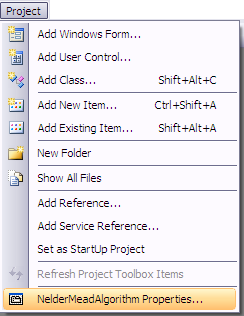
-
Under Build Events, add the following to Post-build event command line:
C#
xcopy "$(ProjectDir)$(OutDir)*.*" "%USERPROFILE%\My Documents\Optimization Tool\algorithms\$(ProjectName)" /s /y /i
xcopy "$(ProjectDir)help" "%USERPROFILE%\My Documents\Optimization Tool\algorithms\$(ProjectName)\help" /s /y /i
xcopy "$(ProjectDir)*.ico" "%USERPROFILE%\My Documents\Optimization Tool\algorithms\$(ProjectName)\" /y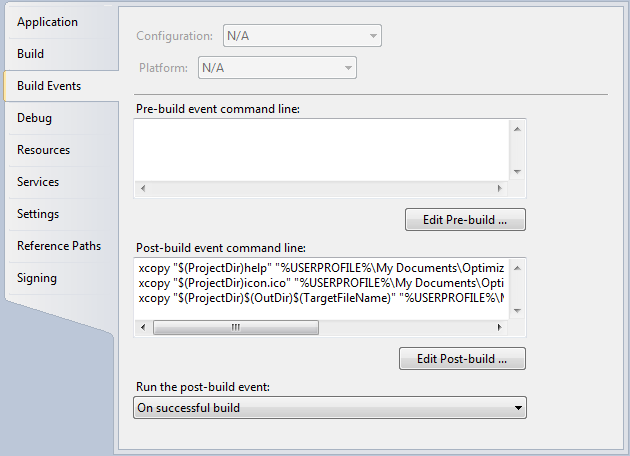
-
The next time the Optimization Tool plug-in is invoked, the algorithm will be available for use.
Add manifest file for algorithm
A manifest file must be added to tell the Optimization Tool which .dll files should be searched for implementations of IAlgorithm. To add the manifest:
-
Right-click on the project in NetBeans and select New > Other from the context menu.
-
Select Other under Categories: and Empty File under File Types: and press the Next button.
-
Name the file manifest.phx and press Finish.
The file should be created in the project's base directory. Open the manifest file and enter the name of the .dll file output by the algorithm project. A single manifest file can specify multiple files that contain IAlgorithm implementations, but only one file name should be specified per line.
