

Concepts and model structure
Last update: 10.09.2025Model
The Model class is the top-level container for PyPrimeMesh.
It contains all information about the PyPrimeMesh session.

This code shows how the Model class is accessed from the
Client class:
import ansys.meshing.prime as prime

prime_client = prime.launch_prime()
model = prime_client.model
This code imports a CAD file containing a single part:
cad_file = prime.examples.download_elbow_scdoc()
params = prime.ImportCadParams(model)
prime.FileIO(model).import_cad(file_name=cad_file, params=params)
The code prints the Model class to obtain a summary
of the current session:
>>> print(model)

    Part Summary:

    Part Name: flow_volume
    Part ID: 2
            13 Topo Edges
            9 Topo Faces
            1 Topo Volumes

            0 Edge Zones
                    Edge Zone Name(s) : []
            0 Face Zones
                    Face Zone Name(s) : []
            1 Volume Zones
                    Volume Zone Name(s) : [volume]

            2 Label(s)
                    Names: [inlet, outlet]

            Bounding box (-203.2 -228.6 -50.8)
                                     (203.2 203.2 50.8)
Parts
Geometry topology and mesh data in the Model class is stored
within any number of parts parameters:
model.parts
Each Part class can contain TopoEntities or zonelets.
TopoEntities are TopoParts created from CAD geometry imports. Zonelets are mesh parts created
from faceted geometry and mesh imports. TopoEntities and zonelets are characterized by the
dimension of entities.

TopoEntities
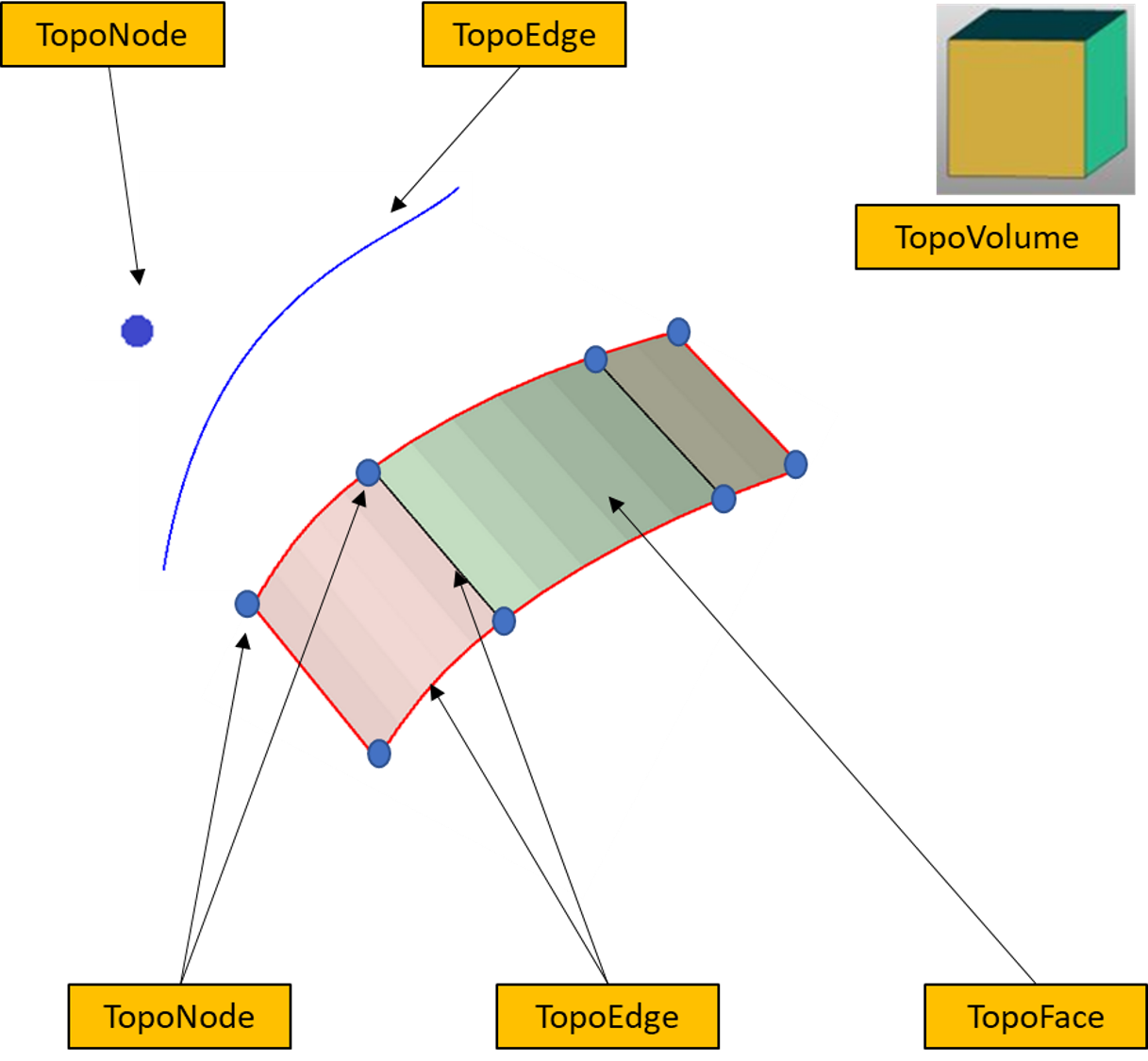
TopoEntities are created from importing a CAD geometry and represent connectivity information. TopoEntities have geometric representation that can be defined by splines or facets. The mesh generated on TopoEntities are projected on the geometry representation.
There are four types of TopoEntities:
- TopoNode: TopoEntity representing points
- TopoEdge: TopoEntity representing curves
- TopoFace: TopoEntity representing surfaces
- TopoVolume: TopoEntity representing volumes
Zonelets
Zonelets are created from importing mesh files and are groups of interconnected entities in a mesh.
There are three types of zonelets:
- FaceZonelet: A group of interconnected faces
- EdgeZonelet: A group of interconnected edges
- CellZonelet: A group of interconnected cells
A volume is a set of face zonelets that define a closed volume without containing any cell elements.
.png)
Zones
Zonelets or TopoEntities can be further grouped into zones. A zonelet or TopoEntity can only be present in a single zone.
When exporting a mesh (MSH or CAS) file to the Fluent solver, you should define the boundary conditions for the zones.
When importing a Fluent solver model, each zone is defined as a single zonelet.
Labels
Labels allow overlapping groups of zonelets or TopoEntities.
When importing CAD files, each group or named selection generates a label.
When exporting to a Mechanical solver (CDB) file, each label is exported as a component.
