

Joint
Last update: 17.07.2025ID table: CS_Joint
Constants
For the joint type (E_JointType):
E_2DSlotJoint, E_BushingJoint, E_CylindricalJoint, E_GeneralJoint,
E_FixedJoint, E_FreeJoint, E_PlanarJoint, E_PointOnCurveJoint,
E_RevoluteJoint, E_ScrewJoint, E_SingleRotationGeneralJoint,
E_SlotJoint, E_SphericalJoint, E_TranslationalJoint,
E_TwoRotationGeneralJoint, E_UniversalJoint,
Members
Name
Name of the joint
ReferenceCoordinateSystem
Joint reference coordinate system
Example:
J1 = CS_Joint.Find(_jid)
CSR = J1.ReferenceCoordinateSystem
MovingCoordinateSystem
Joint moving coordinate system
Example:
J1 = CS_Joint.Find(_jid)
CSM = J1. MovingCoordinateSystem
Type
Joint type
IsRevert
The internal representation of the joint can use flipped reference and mobile
coordinate systems. In that case, all the joint results (for example, forces,
moments, rotation, velocities and acceleration) must be multiplied by -1 to go
from their internal representation to the user representation. As transient
values of joint measures are giving the internal representation, use this
IsRevert information to know if results should be negated.
AccelerationFromVelocitiesDerivatives
When extracting joint degrees of freedom on joints that return true, accelerations should be done using the time derivatives of the joint velocity measure. On joints that return false, joint DOF derivatives should be extracted using the joint acceleration measure. It is important to check this flag first. Use of the wrong method to query joint acceleration can result in failure or incorrect results.
Example:
if Universal.AccelerationFromVelocitiesDerivatives:
 UniversalAccelerationValues=UniversalVelocityM.FillDerivativesThroughTime()
else:
 UniversalAcceleration = Universal.GetAcceleration()
 UniversalAccelerationValues=UniversalAcceleration.FillValuesThroughTime()
Stops
Returns the list of the stops defined on the joint.
Member functions
GetVelocity()
Returns the joint velocity measure. The size of this measure is the number of degrees of freedom of the joint. The derivatives of this measure give access to the joint accelerations.
GetRotation()
Returns the joint rotation measure. The type of measure depends on the joint
number of rotational degrees of freedom (E_1DRotationMeasure,
E_3DRotationMeasure, E_UniversalAngles). These rotations components are
relative to the reference coordinate system of the joint.
GetTranslation()
Returns the joint translation measure. The length of this measure is the number of translational degrees of freedom of the joint. The translation components are expressed in the reference coordinate system of the joint.
GetForce()
Returns the joint force measure. The length of this measure is always 6 (3 forces components, 3 torque component). This force measure is the total force/moment, including constraint forces/moment, external forces/moment applied to the joint, and joint internal forces/moment, such as elastic moment in a revolute joint that has a stiffness on the Z rotation axis. The force measure components are expressed in the global coordinate system. Note that the sign convention is different from the sign convention used in the Joint Probes in Mechanical.
GetAcceleration()
Returns the joint acceleration measures on the joints that are constraint
equations based. See the AccelerationFromVelocitiesDerivatives member to see
when this function should be used.
Example:
J1 = CS_Joint.Find(_jid)
jointRotation = J1.GetRotation()
jointVelocity = J1.GetVelocity()
jointAcceleration = J1.GetAcceleration()
jointForce = J1.GetForce()
SetFrictionVariable(var)
Replaces the constant value already given to the friction coefficient with the
expression given by var.
Example:
Joint = CS_Joint.Find(_jid)
Var = CS_Variable()
u0 = 0.1
u1 = 0.2
alpha = 0.5
Var.SetFunc('u0+u1exp(-alpha*time)',0)
Var.AddInputMeasure(Joint.GetVelocity())
Joint.SetFrictionVariable(Var)
The command has no effect if no value for the friction coefficient has been provided in the UI. For more information, see online help for Joint Friction.
SetFrictionTolerance(tol)
Sets the friction tolerance.
Example:
Joint = CS_Joint.Find(_jid)
Joint = Joint.SetFrictionTolerance(1e-4)
Derived classes
On SphericalJoint, SlotJoint, BushingJoint, FreeJoint, GeneralJoint.
Member function
AddStop(angle_max, restitution_factor)
Adds a spherical stop to a joint that has three rotations. A spherical stop constrains the motion of the X and Y rotational degrees of freedom, to give to the joint the behavior of a loose revolute joint, with a rotational gap. This will allow easier handling of over-constrained systems and building higher fidelity models without having to use contact.
angle_max
The angle between the reference coordinate system Zr axis and the moving coordinate system Zm. Zr is the natural revolute axis.
restitution_factor
The restitution factor, similar to other joint stops.
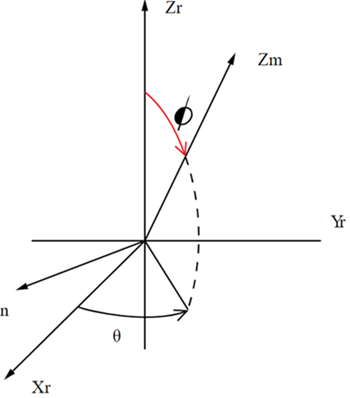
On cylindrical joint
ReplaceByScrew(pitch)
Creates a relation between the translational and the rotational degrees of freedom of a cylindrical joint.
Note
- The pitch is in the current length unit. Any stop and/or lock defined on the original cylindrical joint is not transferred to the screw joint. Similarly, any constraint equation defined on the original cylindrical joint is not converted and so will prevent a proper solution.
- The ReplaceByScrew command is deprecated. It is replaced by the Screw Joint provided in the Mechanical UI.
On bushing joint
GetBushingAngles()
Returns the measure of the joint angles. This measure is used to compute the forces and torques developed in the joint. Note that this is only available for post-processing operations, as the measure does not exist before the solve has been performed.
Creating new joints
The following joint can be created by commands:
CS_GeneralJoint(from, to, FreeX, FreeY, FreeZ, FreeRX, FreeRY, FreeRZ)
Where from and to are of type CS_BodyCoordinateSystem and Free* are
integers where 0 is no available motion and nonzero is available motion.
Selecting two free rotations is not allowed.
