

Non-linear spring damper
Last update: 17.07.2025This example shows how the behavior of a spring can be altered to introduce a non-linear force-displacement relationship. The complete list of commands is shown below. A description of these commands follows.

-
Retrieve the spring object using its ID:
Spring=CS_Actuator.Find(_sid) -
Create an array of real values and fill it with the pairs of values (elongation, force):
Spring_table=System.Array.CreateInstance(float,7,2)

#
# LENGTH transition values
spring_table[0,0]=0.
spring_table[1,0]=50.
spring_table[2,0]=60.
spring_table[3,0]=100.
spring_table[4,0]=140.
spring_table[5,0]=150.
spring_table[6,0]=200.
#
# Spring Stiffness
spring_table[0,1]=-100000.
spring_table[1,1]=-10000.
spring_table[2,1]=-1000.
spring_table[3,1]=0.
spring_table[4,1]=1000.
spring_table[5,1]=10000.
spring_table[6,1]=100000.
stiffness = CS_PointsTable(spring_table)
spring.SetTable(stiffness)
In this command,
7represents the number of rows and2for the number of columns. The first column gives elongation and the second, the corresponding force value. This command generates a PointsTable assigned to the spring, as shown below.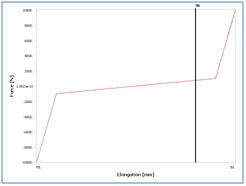
Each spring object in the Mechanical GUI is actually a combination of a spring and a damper. The
GetDampermethod enables you to retrieve the damper object on a given spring, as shown below.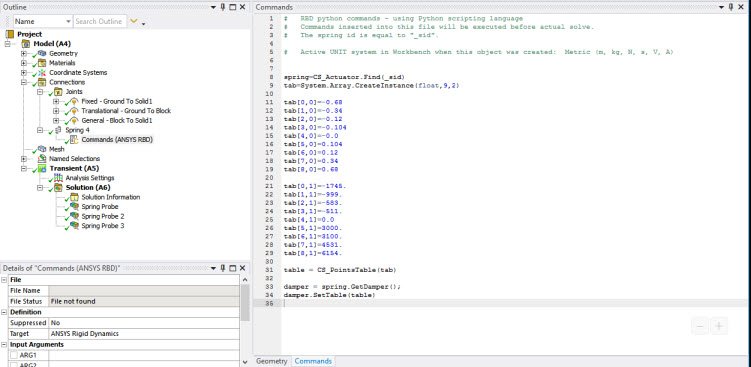
-
Introduce a table to define a non-linear force velocity relation:
Damper=spring.GetDamper()
