Plot data by category
Last update: 16.07.2025Export pedigree data and tensile test results for composite materials, process the data in a pandas DataFrame, and plot summaries of the data (including layup information) using matplotlib and seaborn.
Get data from Granta MI
Connect to Granta MI and specify a database.
from GRANTA_MIScriptingToolkit import granta as mpy

mi = mpy.connect("http://my.server.name/mi_servicelayer", autologon=True)
training_db = mi.get_db('MI Training')
training_db.unit_system = 'Metric'
Specify the records and attributes you want to export from the first table. We want to use attributes describing the layup for all records in the Composite Pedigree table.
comp_pedigree = training_db.get_table('Composite Pedigree')
pedigree_records = comp_pedigree.all_records()
pedigree_attributes = ['Panel number', 'Ply count', 'Panel thickness, average (measured)',
                       'Ply thickness, average (measured)']
comp_pedigree.bulk_fetch(pedigree_records, attributes=pedigree_attributes)
Specify the records you want to export from the second table. Here, a link group is used to export only records linked to records in the first table.
Alternatively, you can specify a table with no link groups to the original table, as long as you can join the two datasets later on. For example, we could search for all records created after a certain date, or tested on a certain machine.
link_group = 'Tensile test data'

# Use a set comprehension to ensure we only select each record once
tensile_test_records = {tr for pr in pedigree_records for tr in pr.links[link_group]}
tensile_test_records = list(tensile_test_records)
Specify the attributes you want to export from the second table. Panel number will be used to relate the tensile tests to the layup data.
tensile_test_data = training_db.get_table('Tensile Test Data')
tensile_attributes = ['Panel number', 'Specimen ID', "Young's Modulus (11-axis)", 'Ultimate Tensile Strength',
                      'Test Type']
tensile_test_data.bulk_fetch(tensile_test_records, attributes=tensile_attributes)
Use DataFrames to pre-process and append the data
Build a separate DataFrame for each table
Create a DataFrame for each Granta MI table. The DataFrames are built from two separate lists of dictionaries:
import pandas as pd
from functools import partial

def get_attr_vals(attributes, r):
    return {mi_attr: r.attributes[mi_attr].value for mi_attr in attributes}

get_pedigree_vals = partial(get_attr_vals, pedigree_attributes)
get_tensile_vals = partial(get_attr_vals, tensile_attributes)

pedigree_data = [get_pedigree_vals(r) for r in pedigree_records]
tensile_data = [get_tensile_vals(r) for r in tensile_test_records]
Create a DataFrame pedigree_df that contains the pedigree records. Set the DataFrame index to be the Panel number attribute value
and sort by the index.
pedigree_df = pd.DataFrame(pedigree_data).set_index('Panel number').sort_index()
pedigree_df.head()
| Ply count | Panel thickness, average (measured) | Ply thickness, average (measured) | |
|---|---|---|---|
| Panel number | |||
| LBJ13 | 6 | 1.397000 | 0.232029 |
| LBJ14 | 6 | 1.431636 | 0.238044 |
| LBJ42 | 6 | 1.438564 | 0.240007 |
| LBJ53 | 6 | 1.385455 | 0.231279 |
| LBJ62 | 6 | 1.410677 | 0.234618 |
Create a second DataFrame tensile_df that contains the tensile test results. Again, set the index to be the Panel number attribute value
and sort by both the index and the Specimen ID.
tensile_df = pd.DataFrame(tensile_data).set_index('Panel number').sort_values(by=["Panel number", "Specimen ID"])
tensile_df.head()
| Specimen ID | Young's Modulus (11-axis) | Ultimate Tensile Strength | Test Type | |
|---|---|---|---|---|
| Panel number | ||||
| LBJ13 | LBJ1311A | 47.594514 | 1582.870937 | 0° tension |
| LBJ13 | LBJ1312A | 47.353197 | 1542.122918 | 0° tension |
| LBJ13 | LBJ1313A | 47.387671 | 1612.952766 | 0° tension |
| LBJ14 | LBJ1413A | [] | 1613.614663 | 0° tension |
| LBJ14 | LBJ1415A | [] | 1611.201497 | 0° tension |
Join the dataframes
Use the dataframe.join() method to create a DataFrame with both sets of data. The join type will default to a left-join if not specified; this is fine in our case because the records were linked via a smart link in Granta MI, and so the set of indices is the same for both DataFrames.
df = pedigree_df.join(tensile_df)
df.head()
| Ply count | Panel thickness, average (measured) | Ply thickness, average (measured) | Specimen ID | Young's Modulus (11-axis) | Ultimate Tensile Strength | Test Type | |
|---|---|---|---|---|---|---|---|
| Panel number | |||||||
| LBJ13 | 6 | 1.397000 | 0.232029 | LBJ1311A | 47.594514 | 1582.870937 | 0° tension |
| LBJ13 | 6 | 1.397000 | 0.232029 | LBJ1312A | 47.353197 | 1542.122918 | 0° tension |
| LBJ13 | 6 | 1.397000 | 0.232029 | LBJ1313A | 47.387671 | 1612.952766 | 0° tension |
| LBJ14 | 6 | 1.431636 | 0.238044 | LBJ1413A | [] | 1613.614663 | 0° tension |
| LBJ14 | 6 | 1.431636 | 0.238044 | LBJ1415A | [] | 1611.201497 | 0° tension |
Finally, create a units dict so you can create plots with meaningful axis labels.
attr_defs = [comp_pedigree.attributes[attr] for attr in pedigree_attributes] + \
            [tensile_test_data.attributes[attr] for attr in tensile_attributes]
units = {attr.name: attr.unit for attr in attr_defs if attr.unit}
units
Previous cell output:
{'Panel thickness, average (measured)': 'mm',
 'Ply thickness, average (measured)': 'mm',
 "Young's Modulus (11-axis)": 'GPa',
 'Ultimate Tensile Strength': 'MPa'}
Plot the data
This code snippet is optional, and is included to increase the size of all plots generated in this notebook.
import matplotlib.pyplot as plt
plt.rcParams['figure.dpi'] = 125
Investigate the relationship between two properties
Create a scatter plot with matplotlib comparing Ultimate Tensile Strength of the panels to Ply thickness, average.
import matplotlib.pyplot as plt

ply_thickness_unit = units['Ply thickness, average (measured)']
ftu_unit = units["Ultimate Tensile Strength"]
ply_thickness_label = rf'Average ply thickness / ${ply_thickness_unit}$'
ftu_label = rf'$F_{{tu}}$ / ${ftu_unit}$'

fig, ax = plt.subplots()
ax.scatter(data=df, x="Ply thickness, average (measured)", y="Ultimate Tensile Strength", alpha=0.75, s=100)
ax.set_xlabel(ply_thickness_label)
ax.set_ylabel(ftu_label)
_ = ax.set_title(r'$F_{tu}$ vs Average ply thickness')
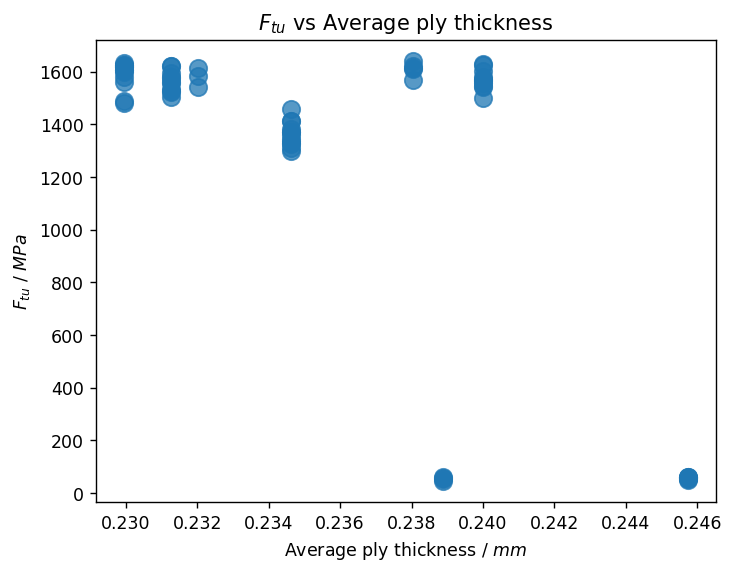
There is a significant difference between the results at 1200 - 1600 MPa and the group below 100 MPa. We need to identify what causes this difference, and then represent the data in a clearer way.
Investigate the impact of other properties
First, examine the underlying data; use the DataFrame.describe() method to view a statistical summary of the data in each column.
df.describe(include='all')
| Ply count | Panel thickness, average (measured) | Ply thickness, average (measured) | Specimen ID | Young's Modulus (11-axis) | Ultimate Tensile Strength | Test Type | |
|---|---|---|---|---|---|---|---|
| count | 67.000000 | 67.000000 | 67.000000 | 67 | 67 | 67.000000 | 67 |
| unique | NaN | NaN | NaN | 67 | 19 | NaN | 2 |
| top | NaN | NaN | NaN | LBJ1311A | [] | NaN | 0° tension |
| freq | NaN | NaN | NaN | 1 | 49 | NaN | 56 |
| mean | 6.492537 | 1.534167 | 0.235604 | NaN | NaN | 1288.110261 | NaN |
| std | 1.119701 | 0.294450 | 0.005039 | NaN | NaN | 557.743977 | NaN |
| min | 6.000000 | 1.379415 | 0.229948 | NaN | NaN | 44.629768 | NaN |
| 25% | 6.000000 | 1.385455 | 0.231279 | NaN | NaN | 1353.613343 | NaN |
| 50% | 6.000000 | 1.410677 | 0.234618 | NaN | NaN | 1545.653034 | NaN |
| 75% | 6.000000 | 1.438564 | 0.240007 | NaN | NaN | 1603.610369 | NaN |
| max | 9.000000 | 2.213429 | 0.245727 | NaN | NaN | 1639.559637 | NaN |
The Test Type column summary shows that the most frequent value is '0° tension' (as expected), but there are 9 occurrences of a second test type.
To identify all possible values in the Test Type column, use DataFrame['Test Type'].unique().
df['Test Type'].unique()
Previous cell output:
array(['0° tension', '90° tension'], dtype=object)
Although there is only one populated attribute for Ultimate Tensile Strength and Young's modulus, the Test Type column shows that the tensile tests were performed in two different directions.
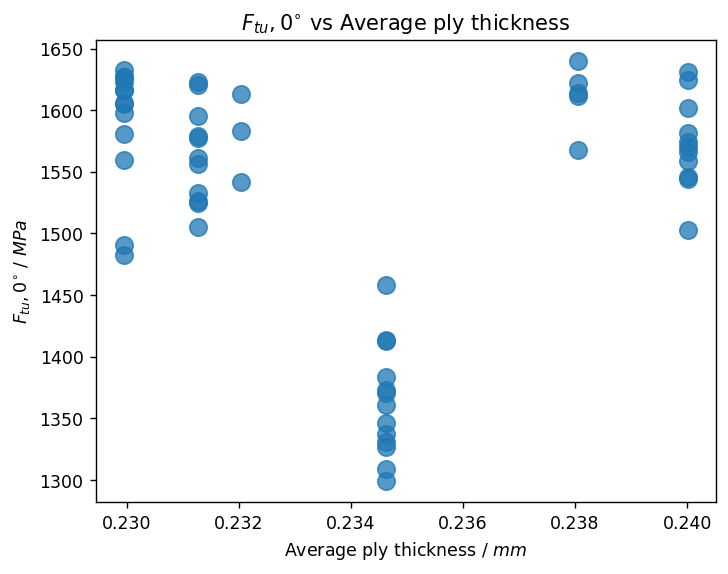
Since composite materials are often highly orthotropic, the direction of the test must be taken into account when plotting the results. We can filter the DataFrame based on the Test Type column when plotting:
ftu_0_label = rf'$F_{{tu}}, 0^{{\circ}}$ / ${ftu_unit}$'
df_0_tension = df[df['Test Type'] == '0° tension']

fig, ax = plt.subplots()
ax.scatter(data=df_0_tension,
           x="Ply thickness, average (measured)",
           y="Ultimate Tensile Strength",
           alpha=0.75,
           s=100)
ax.set_xlabel(ply_thickness_label)
ax.set_ylabel(ftu_0_label)
_ = ax.set_title(r'$F_{tu}, 0^{{\circ}}$ vs Average ply thickness')
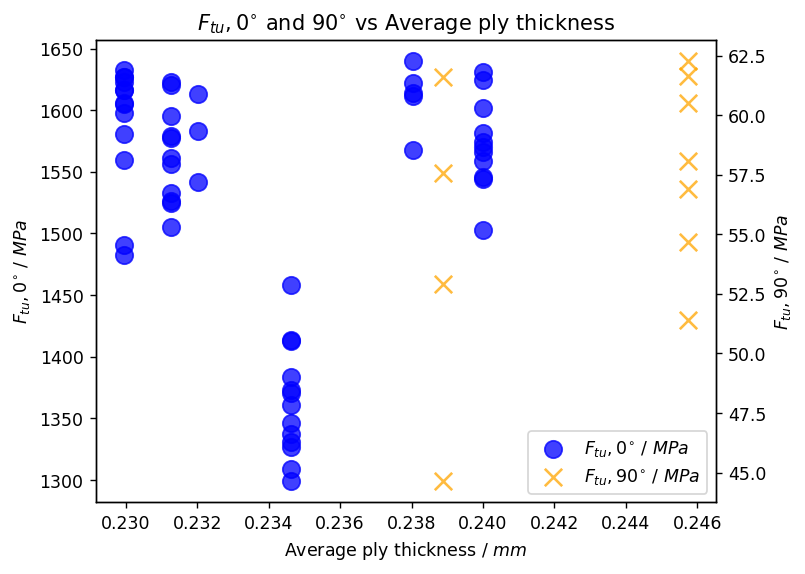
We can also overlay the 90° Ultimate Tensile Strength results, using .twinx() to plot them on a separate y-axis.
ftu_90_label = rf'$F_{{tu}}, 90^{{\circ}}$ / ${ftu_unit}$'
df_90_tension = df[df['Test Type'] == '90° tension']

fig, ax1 = plt.subplots()
ax1.scatter(data=df_0_tension,
            x="Ply thickness, average (measured)",
            y="Ultimate Tensile Strength",
            color="blue",
            marker="o",
            alpha=0.75,
            s=100)
ax2 = plt.twinx()
ax2.scatter(data=df_90_tension,
            x="Ply thickness, average (measured)",
            y="Ultimate Tensile Strength",
            color="orange",
            marker="x",
            alpha=0.75,
            s=100)

ax1.set_xlabel(ply_thickness_label)
ax1.set_ylabel(ftu_0_label)
ax2.set_ylabel(ftu_90_label)

h1, l1 = ax1.get_legend_handles_labels()
h2, l2 = ax2.get_legend_handles_labels()

ax1.legend(h1+h2, [ftu_0_label, ftu_90_label], loc='lower right')
_ = ax1.set_title(r'$F_{tu}, 0^{{\circ}}$ and $90^{{\circ}}$ vs Average ply thickness')